<?xml version="1.0" encoding="utf-8"?><feed xmlns="http://www.w3.org/2005/Atom" ><generator uri="https://jekyllrb.com/" version="4.1.1">Jekyll</generator><link href="https://blog.kubeflow.org/feed.xml" rel="self" type="application/atom+xml" /><link href="https://blog.kubeflow.org/" rel="alternate" type="text/html" /><updated>2026-04-12T01:08:42+00:00</updated><id>https://blog.kubeflow.org/feed.xml</id><title type="html">Kubeflow</title><subtitle>The Machine Learning Toolkit for Kubernetes.</subtitle><author><name>{&quot;name&quot;=&gt;&quot;&quot;, &quot;email&quot;=&gt;&quot;&quot;}</name><email></email></author><entry><title type="html">Kubeflow AI Reference Platform 26.03 Release Announcement</title><link href="https://blog.kubeflow.org/kubeflow-26.03-release/" rel="alternate" type="text/html" title="Kubeflow AI Reference Platform 26.03 Release Announcement" /><published>2026-04-11T00:00:00+00:00</published><updated>2026-04-11T00:00:00+00:00</updated><id>https://blog.kubeflow.org/kubeflow-26.03-release</id><content type="html" xml:base="https://blog.kubeflow.org/kubeflow-26.03-release/"><![CDATA[<p>Kubeflow AI Reference Platform 26.03 delivers key improvements in scalability, security, and operational efficiency. It reduces per-namespace overhead, enhances multi-tenant configurations, and increases reliability for large-scale Kubernetes deployments.</p>

<p>This release adopts a calendar-based versioning model (Year.Month.Patch), with two primary releases annually and optional patches. Community support is best-effort for approximately six months, with additional commercial support options available. Regular upgrades are recommended to take advantage of continuous security and performance enhancements.</p>

<h2 id="highlight-features">Highlight features</h2>

<ul>
  <li>Kubernetes 1.34+</li>
  <li>Kubeflow Pipelines 2.16.0, Spark operator 2.5.0 Model registry v0.3.5, Kserve Web Application v0.16.1</li>
  <li>Compatibility of Kubeflow Pipelines v1 and v2 with PSS restricted</li>
  <li>Extended Kserve test with authentication and authorization from inside and outside the cluster as well as non-knative / raw deployments</li>
  <li>Simplified installation and automatic installation of the right Kustomize and Kubectl versions</li>
  <li>Installation steps tested and based on our CI, easier in-place updates (optimized PDBs)</li>
  <li>Cleanup of all synchronization steps for faster releases / updates of dependencies</li>
  <li>Knative 1.20, cert-manager 1.19.4, Oauth2-proxy v7.14.3, Dex 2.45.0</li>
  <li>Fix networkpolicies for cert-manager, knative-serving, istio-system, dex, oauth2-proxy</li>
</ul>

<h2 id="kubeflow-platform-manifests--security">Kubeflow Platform (Manifests &amp; Security)</h2>

<p>The Kubeflow Platform Working Group focuses on simplifying Kubeflow installation, operations, and security. See details below.</p>

<h3 id="manifests">Manifests:</h3>

<ul>
  <li><a href="https://github.com/kubeflow/manifests/blob/master/README.md">Documentation updates</a> that make it easier to install,
extend and upgrade Kubeflow</li>
  <li>For more details and future plans please check <a href="link">26.06</a> roadmap.</li>
</ul>

<table>
  <thead>
    <tr>
      <th style="text-align: center">Notebooks</th>
      <th style="text-align: center">Dashboard</th>
      <th style="text-align: center">Pipelines</th>
      <th style="text-align: center">Katib</th>
      <th style="text-align: center">Trainer</th>
      <th style="text-align: center">KServe</th>
      <th style="text-align: center">Model Registry</th>
      <th style="text-align: center">Spark</th>
      <th>SDK</th>
    </tr>
  </thead>
  <tbody>
    <tr>
      <td style="text-align: center"><a href="">1.10.0</a></td>
      <td style="text-align: center"><a href="https://github.com/kubeflow/kubeflow/releases/tag/v1.10.0">1.10.0</a></td>
      <td style="text-align: center"><a href="https://github.com/kubeflow/pipelines/releases/tag/2.16.0">2.16.0</a></td>
      <td style="text-align: center"><a href="https://github.com/kubeflow/katib/releases/tag/v0.19.0">0.19</a></td>
      <td style="text-align: center"><a href="https://github.com/kubeflow/trainer/releases/tag/v2.1.0">2.1.0</a></td>
      <td style="text-align: center"><a href="https://github.com/kserve/kserve/releases/tag/v0.17.0">0.17.0</a></td>
      <td style="text-align: center"><a href="https://github.com/kubeflow/model-registry/releases/tag/v0.3.7">0.3.7</a></td>
      <td style="text-align: center"><a href="https://github.com/kubeflow/spark-operator/releases/tag/v2.5.0">2.5.0</a></td>
      <td><a href="https://github.com/kubeflow/sdk/releases/tag/0.4.0"> 0.4.0 </a></td>
    </tr>
  </tbody>
</table>

<table>
  <thead>
    <tr>
      <th style="text-align: center">Kubernetes</th>
      <th style="text-align: center">Kind</th>
      <th style="text-align: center">Kustomize</th>
      <th style="text-align: center">Cert Manager</th>
      <th style="text-align: center">Knative</th>
      <th style="text-align: center">Istio</th>
      <th style="text-align: center">Dex</th>
      <th style="text-align: center">OAuth2-proxy</th>
    </tr>
  </thead>
  <tbody>
    <tr>
      <td style="text-align: center">[1.35+] (https://github.com/kubernetes/kubernetes/releases/tag/v1.35.3)</td>
      <td style="text-align: center"><a href="https://github.com/kubernetes-sigs/kind/releases/tag/v0.31.0">0.30.1</a></td>
      <td style="text-align: center"><a href="https://github.com/kubernetes-sigs/kustomize/releases/tag/kustomize%2Fv5.8.1">5.8.1</a></td>
      <td style="text-align: center"><a href="https://github.com/cert-manager/cert-manager/releases/tag/v1.20.2">1.20.2</a></td>
      <td style="text-align: center"><a href="https://knative.dev/blog/releases/announcing-knative-v1-21-release/">1.21.0</a></td>
      <td style="text-align: center"><a href="https://github.com/istio/istio/releases/tag/1.29.1">1.29.1</a></td>
      <td style="text-align: center"><a href="https://github.com/dexidp/dex/releases/tag/v2.45.1">2.45.1</a></td>
      <td style="text-align: center"><a href="https://github.com/oauth2-proxy/oauth2-proxy/releases/tag/v7.15.1">7.15.1</a></td>
    </tr>
  </tbody>
</table>

<h3 id="security">Security:</h3>

<h2 id="pipelines">Pipelines</h2>

<h2 id="model-registry">Model Registry</h2>

<h2 id="training-operator-trainer--katib">Training Operator (Trainer) &amp; Katib</h2>

<h2 id="spark-operator">Spark Operator</h2>

<h2 id="kserve">KServe</h2>

<h2 id="kubeflow-sdk">Kubeflow SDK</h2>

<h2 id="dashboard-and-notebooks">Dashboard and Notebooks</h2>

<h2 id="how-to-get-started-with-2603">How to get started with 26.03</h2>

<p>Visit the Kubeflow AI Reference Platform 26.03 <a href="https://github.com/kubeflow/manifests/releases">release page</a> or head over to the Getting Started and Support pages.</p>

<h2 id="join-the-community">Join the Community</h2>

<p>We would like to thank everyone who contributed to Kubeflow 26.03, and especially Tarek Abouzeid for his work as the v26.03 Release Manager. We also extend our thanks to the entire release team and the working group leads, who continuously and generously dedicate their time and expertise to Kubeflow.</p>

<p>Release team members : Tarek Abouzeid, Anya Kramar, Andy Stoneberg, Humair Khan, Matteo Mortari, Adysen Rothman, Jon Burdo, Milos Grubjesic, Vraj Bhatt, Dhanisha Phadate, Alok Dangre</p>

<p>Working Group leads : Andrey Velichkevich, Julius von Kohout, Mathew Wicks, Matteo Mortari</p>

<p>Kubeflow Steering Committee : Andrey Velichkevich, Julius von Kohout, Yuan Tang, Johnu George, Francisco Javier Araceo</p>

<p>You can find more details about Kubeflow distributions
<a href="https://www.kubeflow.org/docs/started/installing-kubeflow/#packaged-distributions">here</a>.</p>

<h2 id="want-to-help">Want to help?</h2>

<p>The Kubeflow community Working Groups hold open meetings and are always looking for more volunteers and users to unlock
the potential of machine learning. If you’re interested in becoming a Kubeflow contributor, please feel free to check
out the resources below. We look forward to working with you!</p>

<ul>
  <li>Visit our <a href="https://www.kubeflow.org/docs/about/community/">Kubeflow website</a> or Kubeflow GitHub Page.</li>
  <li>Join the <a href="https://www.kubeflow.org/docs/about/community/">Kubeflow Slack channel</a>.</li>
  <li>Join the <a href="https://groups.google.com/g/kubeflow-discuss">kubeflow-discuss</a> mailing list.</li>
  <li>Attend our weekly <a href="https://www.kubeflow.org/docs/about/community/#kubeflow-community-call">community meeting</a>.</li>
</ul>]]></content><author><name>Kubeflow 26.03 Release Team</name></author><category term="release" /><summary type="html"><![CDATA[Kubeflow AI Reference Platform 26.03 delivers key improvements in scalability, security, and operational efficiency. It reduces per-namespace overhead, enhances multi-tenant configurations, and increases reliability for large-scale Kubernetes deployments.]]></summary><media:thumbnail xmlns:media="http://search.yahoo.com/mrss/" url="https://blog.kubeflow.org/images/logo.png" /><media:content medium="image" url="https://blog.kubeflow.org/images/logo.png" xmlns:media="http://search.yahoo.com/mrss/" /></entry><entry><title type="html">Modernizing Kubeflow Pipelines UI</title><link href="https://blog.kubeflow.org/modernizing-kubeflow-pipelines-ui/" rel="alternate" type="text/html" title="Modernizing Kubeflow Pipelines UI" /><published>2026-03-31T00:00:00+00:00</published><updated>2026-03-31T00:00:00+00:00</updated><id>https://blog.kubeflow.org/modernizing-kubeflow-pipelines-ui</id><content type="html" xml:base="https://blog.kubeflow.org/modernizing-kubeflow-pipelines-ui/"><![CDATA[<p>The Kubeflow Pipelines web interface has been upgraded from React 16 to React 19 — a modernization effort that touches every layer of the frontend stack. Whether you use the UI to manage pipelines day-to-day or contribute to the codebase, here is what this means for you.</p>

<h2 id="whats-changing-for-users">What’s changing for users</h2>

<p>You do not need to do anything differently. Your bookmarks, workflows, and browser all work exactly as before. But under the hood, the UI is now built on a modern foundation that delivers tangible improvements:</p>

<h3 id="a-faster-more-responsive-interface">A faster, more responsive interface</h3>

<p>React 18 introduced automatic batching, which reduces unnecessary re-renders across the UI. In practice, this means pages like Run Details, Experiment Details, and the pipeline creation flow respond faster to your interactions. Forms validate without flicker, and multi-step workflows feel snappier. The production bundle size stayed exactly the same — 0% increase — so page load times are unchanged.</p>

<h3 id="smoother-pipeline-graph-navigation">Smoother pipeline graph navigation</h3>

<p>The pipeline DAG visualization (the graph you see when inspecting a pipeline’s structure) has been migrated from the deprecated react-flow-renderer to @xyflow/react. This brings improved pan, zoom, and drag performance, especially on larger or more complex pipeline graphs. If you’ve ever experienced sluggishness when navigating a deeply nested pipeline, this upgrade directly addresses that.</p>

<h3 id="improved-charts-and-metrics-display">Improved charts and metrics display</h3>

<p>Run metrics and comparison charts now use Recharts instead of the deprecated react-vis library. The new charting library renders more efficiently, handles edge cases better, and provides cleaner visual output when comparing run results side by side.</p>

<h3 id="better-accessibility">Better accessibility</h3>

<p>The component library migration from Material-UI v3 to MUI v5 brings improved keyboard navigation, better ARIA attribute coverage, and more consistent focus management across dialogs, tables, and form elements. These improvements make the UI more usable with screen readers and keyboard-only workflows.</p>

<h3 id="no-breaking-changes">No breaking changes</h3>

<p>Every user-facing feature works the same way it did before. The API contracts are unchanged. If you use the KFP Python SDK or REST API to interact with the platform, nothing changes on your end. This upgrade was purely a frontend modernization — zero impact on backend behavior, pipeline execution, or artifact storage.</p>

<h2 id="why-we-made-this-change">Why we made this change</h2>

<p>The KFP frontend had been running on React 16 (released in 2017) with Material-UI v3, create-react-app, and Jest/Enzyme for testing. This created compounding issues:</p>

<ul>
  <li><strong>Security exposure.</strong> React 16 and 17 no longer receive security patches, and dozens of transitive dependencies were locked to outdated versions because of React peer constraints.</li>
  <li><strong>Stalled ecosystem.</strong> Modern libraries — including improved data-fetching, visualization, and accessibility tools — dropped support for React 16/17. Staying behind meant the UI could not benefit from upstream improvements.</li>
  <li><strong>Contributor friction.</strong> The legacy CRA + Jest + Enzyme toolchain was slow to build, brittle to test, and increasingly difficult for new contributors to set up. Modernizing the stack lowers the barrier to contribution.</li>
</ul>

<h2 id="how-we-got-here">How we got here</h2>

<p>Rather than attempting a single risky version jump, we followed a deps-first, bump-last strategy: upgrade every dependency to be forward-compatible before touching React itself. A custom React peer compatibility gate in CI prevented regressions at every step. The work was executed across <strong>20+</strong> pull requests in strict dependency order.</p>

<h3 id="react-16--17-rebuilding-the-foundation">React 16 → 17: Rebuilding the foundation</h3>

<p>Before React could move forward, the entire build and test toolchain had to be replaced. create-react-app was swapped for Vite, Jest + Enzyme gave way to Vitest + Testing Library, and Material-UI was upgraded from v3 to v4 to unblock the React 17 peer range. The deprecated react-vis charting library was replaced with Recharts. With those blockers cleared, the React 17 bump itself was a small, low-risk change.</p>

<h3 id="react-17--18-the-biggest-leap">React 17 → 18: The biggest leap</h3>

<p>This phase required the most dependency work. Storybook jumped from v6 straight to v10 on the Vite builder. Material-UI v4 was migrated to MUI v5 with Emotion. react-query moved to @tanstack/react-query v4. react-flow-renderer was replaced with @xyflow/react. After all ecosystem deps cleared the peer gate, the React 18 core bump landed — followed by careful stabilization of automatic batching behavior in class components that were reading stale state.</p>

<h3 id="react-18--19-the-final-stretch">React 18 → 19: The final stretch</h3>

<p>A deprecation audit at React 18.3 found zero React-specific warnings. A final dependency sweep cleared the last peer blockers (react-ace, transitive react-redux). The React 19 bump resolved the final allowlist entry and handled a small set of API changes like the removal of forwardRef in test mocks.</p>

<h2 id="the-full-stack-transformation">The full stack transformation</h2>

<p>Over the course of this effort, virtually every layer of the frontend stack was modernized:</p>

<table>
  <thead>
    <tr>
      <th>Layer</th>
      <th>Before</th>
      <th>After</th>
    </tr>
  </thead>
  <tbody>
    <tr>
      <td>React</td>
      <td>16</td>
      <td>19</td>
    </tr>
    <tr>
      <td>Build system</td>
      <td>Create React App + Craco</td>
      <td>Vite</td>
    </tr>
    <tr>
      <td>Test framework</td>
      <td>Jest + Enzyme</td>
      <td>Vitest + Testing Library</td>
    </tr>
    <tr>
      <td>UI component library</td>
      <td>Material-UI v3</td>
      <td>MUI v5 + Emotion</td>
    </tr>
    <tr>
      <td>Data fetching</td>
      <td>react-query v3</td>
      <td>@tanstack/react-query v4</td>
    </tr>
    <tr>
      <td>Pipeline graph</td>
      <td>react-flow-renderer v9</td>
      <td>@xyflow/react</td>
    </tr>
    <tr>
      <td>Charts</td>
      <td>react-vis</td>
      <td>Recharts</td>
    </tr>
    <tr>
      <td>Storybook</td>
      <td>6 (Webpack)</td>
      <td>10 (Vite)</td>
    </tr>
  </tbody>
</table>

<h2 id="by-the-numbers">By the numbers</h2>

<ul>
  <li>20+ PRs merged across the entire React 16-to-19 effort</li>
  <li><strong>15 tracked milestones</strong> executed in strict dependency order</li>
  <li><strong>0% bundle size increase</strong> — page load times unchanged</li>
  <li><strong>0 React deprecation warnings</strong> at the 18.3 checkpoint audit</li>
  <li><strong>0 breaking changes</strong> to user-facing features or APIs</li>
</ul>

<h2 id="want-to-contribute">Want to contribute?</h2>

<p>The full execution plan with every PR, issue, and dependency graph is tracked in the <a href="https://github.com/kubeflow/pipelines/blob/master/frontend/docs/react-18-19-upgrade-checklist.md">react-18-19-upgrade-checklist.md</a>. Look for miscellaneous bugs, report bugs, help with reviews and help improve our documentation.</p>

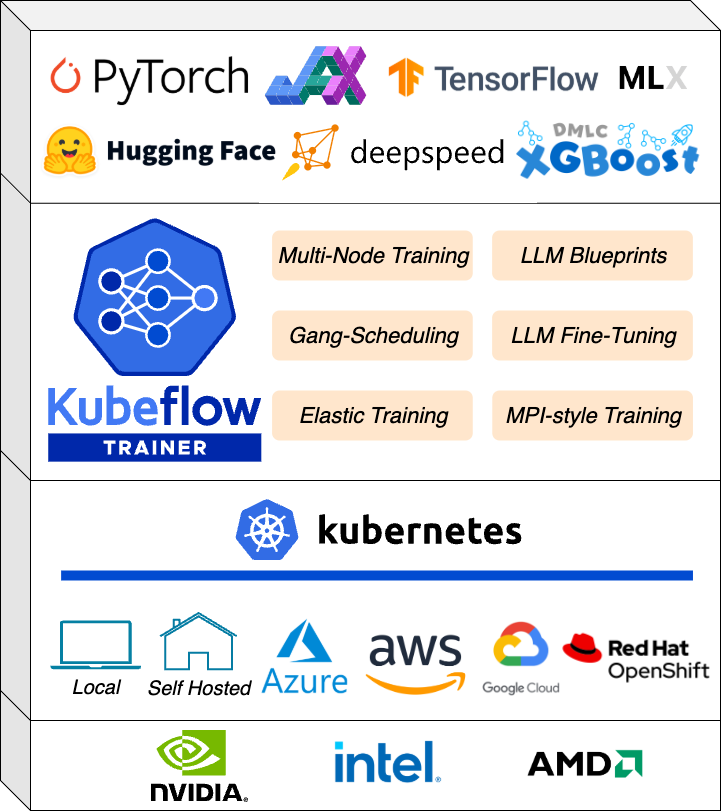
<p>Huge thanks to <a href="https://github.com/jeffspahr">@jeffspahr</a>, <a href="https://github.com/kanishka-commits">@kanishka-commits</a>, <a href="https://github.com/PR3MM">@PR3MM</a>, <a href="https://github.com/jsonmp-k8">@jsonmp-k8</a>, <a href="https://github.com/dpanshug">@dpanshug</a>, and <a href="https://github.com/rishi-jat">@rishi-jat</a> for contributing to this effort and reviewing all the contributions leading up to this milestone!</p>]]></content><author><name>Manaswini Das</name></author><category term="pipelines" /><summary type="html"><![CDATA[The Kubeflow Pipelines web interface has been upgraded from React 16 to React 19 — a modernization effort that touches every layer of the frontend stack. Whether you use the UI to manage pipelines day-to-day or contribute to the codebase, here is what this means for you.]]></summary></entry><entry><title type="html">Kubeflow Trainer v2.2: JAX &amp;amp; XGBoost Runtimes, Flux for HPC Support, and TrainJob progress and metrics observability</title><link href="https://blog.kubeflow.org/kubeflow-trainer-v2.2-release/" rel="alternate" type="text/html" title="Kubeflow Trainer v2.2: JAX &amp;amp; XGBoost Runtimes, Flux for HPC Support, and TrainJob progress and metrics observability" /><published>2026-03-20T00:00:00+00:00</published><updated>2026-03-20T00:00:00+00:00</updated><id>https://blog.kubeflow.org/introducing-kubeflow-trainer-v2.2</id><content type="html" xml:base="https://blog.kubeflow.org/kubeflow-trainer-v2.2-release/"><![CDATA[<p>Just a little over one week ahead of KubeCon + CloudNativeCon EU 2026, the Kubeflow team is excited to ship Trainer v2.2. The v2.2 release reinforces our commitment to expanding the Kubeflow Trainer ecosystem – meeting developers where they are by adding native support for JAX, XGBoost, and Flux, while also delivering deeper observability into training jobs.</p>

<p>Key highlights of the v2.2 release include:</p>

<ul>
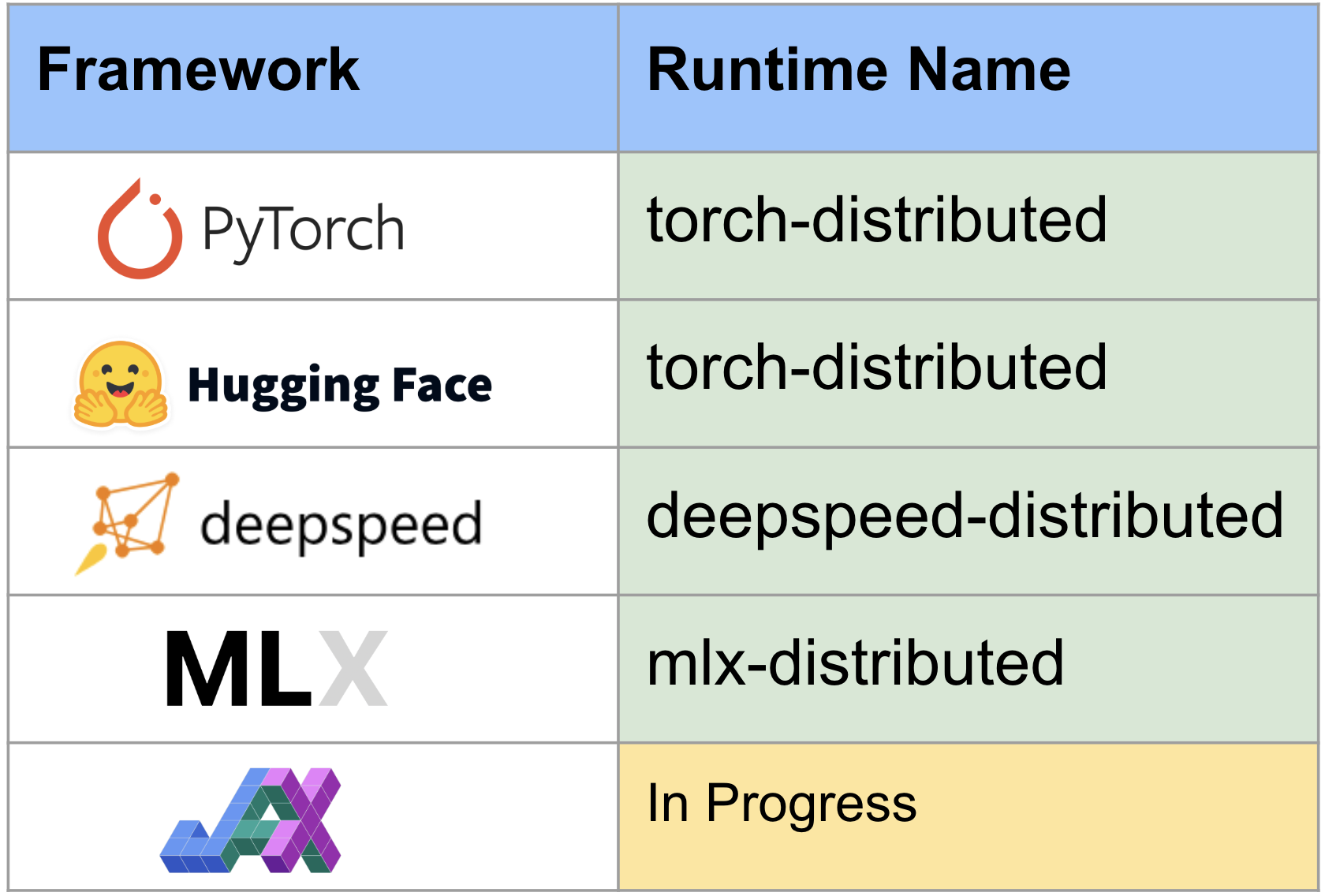
  <li><strong>First-class support for Training Runtimes</strong> for <a href="https://www.kubeflow.org/docs/components/trainer/user-guides/jax/">JAX</a> and <a href="https://www.kubeflow.org/docs/components/trainer/user-guides/xgboost/">XGBoost</a>, enabling native distributed training on Kubernetes. This marks a major milestone for the Trainer project, achieving full compatibility with Training Operator v1 CRDs: PyTorchJob, MPIJob, JAXJob, and XGBoostJob – now unified under a single TrainJob abstraction.</li>
  <li><a href="https://github.com/kubeflow/trainer/tree/master/docs/proposals/2779-trainjob-progress"><strong>Enhanced training observability</strong></a>, allowing progress and metrics to be propagated directly from training scripts to the TrainJob status. <a href="https://github.com/huggingface/transformers/pull/44487">Hugging Face Transformers</a> already integrate with the <em>KubeflowTrainerCallback</em> to automate this capability.</li>
  <li><a href="https://www.kubeflow.org/docs/components/trainer/user-guides/flux/"><strong>Flux runtime support</strong></a>, bringing HPC workloads to Kubernetes and improving MPI bootstrapping within TrainJob.</li>
  <li><a href="https://github.com/kubeflow/trainer/tree/master/docs/proposals/2899-resource-timeouts"><strong>TrainJob activeDeadlineSeconds API</strong></a>, enabling explicit timeout policies for training jobs.</li>
  <li><a href="https://www.kubeflow.org/docs/components/trainer/operator-guides/runtime-patches/"><strong>RuntimePatches API</strong></a>, introducing a more flexible and scalable way to customize runtime configurations from the TrainJobs.</li>
</ul>

<p>You can now install the Kubeflow Trainer control plane and its training runtimes with a single command:</p>

<div class="language-shell highlighter-rouge"><div class="highlight"><pre class="highlight"><code>helm <span class="nb">install </span>kubeflow-trainer oci://ghcr.io/kubeflow/charts/kubeflow-trainer <span class="se">\</span>
    <span class="nt">--namespace</span> kubeflow-system <span class="se">\</span>
    <span class="nt">--create-namespace</span> <span class="se">\</span>
    <span class="nt">--version</span> 2.2.0 <span class="se">\</span>
    <span class="nt">--set</span> runtimes.defaultEnabled<span class="o">=</span><span class="nb">true</span>
</code></pre></div></div>

<h2 id="bringing-jax-to-kubernetes-with-trainer">Bringing JAX to Kubernetes with Trainer</h2>

<p>Kubeflow Trainer supports running JAX workloads on Kubernetes through the <code class="language-plaintext highlighter-rouge">jax-distributed</code> runtime. It is designed for distributed and parallel JAX computation using jax.distributed and SPMD primitives like pmap, pjit, and shard_map. The runtime maps one Kubernetes Pod to one JAX process and injects the required distributed environment variables so training or fine-tuning can run consistently across multiple nodes and devices.</p>

<ul>
  <li>Multi-process CPU training</li>
  <li>Multi-GPU training using CUDA enabled JAX</li>
  <li>Data-parallel and model-parallel JAX workloads</li>
  <li>Massive scale <a href="https://github.com/kubeflow/website/pull/4343">TPU distributed training</a> with ComputeClases</li>
</ul>

<p>Start by following the Getting Started guide for Kubeflow Trainer basics and making sure you have Kubeflow SDK installed on your machine:</p>

<div class="language-shell highlighter-rouge"><div class="highlight"><pre class="highlight"><code>pip <span class="nb">install </span>kubeflow 
</code></pre></div></div>

<p>Use the jax-distributed runtime and initialize JAX distributed explicitly in your training script before any JAX computation:</p>

<div class="language-py highlighter-rouge"><div class="highlight"><pre class="highlight"><code>
<span class="kn">from</span> <span class="nn">kubeflow.trainer</span> <span class="kn">import</span> <span class="n">TrainerClient</span><span class="p">,</span> <span class="n">CustomTrainer</span>

<span class="k">def</span> <span class="nf">get_jax_dist</span><span class="p">():</span>
    <span class="kn">import</span> <span class="nn">os</span>
    <span class="kn">import</span> <span class="nn">jax</span>
    <span class="kn">import</span> <span class="nn">jax.distributed</span> <span class="k">as</span> <span class="n">dist</span>

    <span class="n">dist</span><span class="p">.</span><span class="n">initialize</span><span class="p">(</span>
        <span class="n">coordinator_address</span><span class="o">=</span><span class="n">os</span><span class="p">.</span><span class="n">environ</span><span class="p">[</span><span class="s">"JAX_COORDINATOR_ADDRESS"</span><span class="p">],</span>
        <span class="n">num_processes</span><span class="o">=</span><span class="nb">int</span><span class="p">(</span><span class="n">os</span><span class="p">.</span><span class="n">environ</span><span class="p">[</span><span class="s">"JAX_NUM_PROCESSES"</span><span class="p">]),</span>
        <span class="n">process_id</span><span class="o">=</span><span class="nb">int</span><span class="p">(</span><span class="n">os</span><span class="p">.</span><span class="n">environ</span><span class="p">[</span><span class="s">"JAX_PROCESS_ID"</span><span class="p">]),</span>
    <span class="p">)</span>

    <span class="k">print</span><span class="p">(</span><span class="s">"JAX Distributed Environment"</span><span class="p">)</span>
    <span class="k">print</span><span class="p">(</span><span class="sa">f</span><span class="s">"Local devices: </span><span class="si">{</span><span class="n">jax</span><span class="p">.</span><span class="n">local_devices</span><span class="p">()</span><span class="si">}</span><span class="s">"</span><span class="p">)</span>
    <span class="k">print</span><span class="p">(</span><span class="sa">f</span><span class="s">"Global device count: </span><span class="si">{</span><span class="n">jax</span><span class="p">.</span><span class="n">device_count</span><span class="p">()</span><span class="si">}</span><span class="s">"</span><span class="p">)</span>

    <span class="kn">import</span> <span class="nn">jax.numpy</span> <span class="k">as</span> <span class="n">jnp</span>
    <span class="n">x</span> <span class="o">=</span> <span class="n">jnp</span><span class="p">.</span><span class="n">ones</span><span class="p">((</span><span class="mi">4</span><span class="p">,))</span>
    <span class="n">y</span> <span class="o">=</span> <span class="n">jax</span><span class="p">.</span><span class="n">pmap</span><span class="p">(</span><span class="k">lambda</span> <span class="n">v</span><span class="p">:</span> <span class="n">v</span> <span class="o">*</span> <span class="n">jax</span><span class="p">.</span><span class="n">process_index</span><span class="p">())(</span><span class="n">x</span><span class="p">)</span>
    <span class="k">print</span><span class="p">(</span><span class="s">"PMAP result:"</span><span class="p">,</span> <span class="n">y</span><span class="p">)</span>

<span class="n">client</span> <span class="o">=</span> <span class="n">TrainerClient</span><span class="p">()</span>
<span class="n">job_id</span> <span class="o">=</span> <span class="n">client</span><span class="p">.</span><span class="n">train</span><span class="p">(</span>
    <span class="n">runtime</span><span class="o">=</span><span class="s">"jax-distributed"</span><span class="p">,</span>
    <span class="n">trainer</span><span class="o">=</span><span class="n">CustomTrainer</span><span class="p">(</span><span class="n">func</span><span class="o">=</span><span class="n">get_jax_dist</span><span class="p">),</span>
<span class="p">)</span>
<span class="n">client</span><span class="p">.</span><span class="n">wait_for_job_status</span><span class="p">(</span><span class="n">job_id</span><span class="p">)</span>
<span class="k">print</span><span class="p">(</span><span class="s">"</span><span class="se">\n</span><span class="s">"</span><span class="p">.</span><span class="n">join</span><span class="p">(</span><span class="n">client</span><span class="p">.</span><span class="n">get_job_logs</span><span class="p">(</span><span class="n">name</span><span class="o">=</span><span class="n">job_id</span><span class="p">)))</span>
</code></pre></div></div>

<p>The <code class="language-plaintext highlighter-rouge">jax-distributed</code> runtime injects <code class="language-plaintext highlighter-rouge">JAX_NUM_PROCESSES, JAX_PROCESS_ID, and JAX_COORDINATOR_ADDRESS</code> into the environment, and all processes must call <code class="language-plaintext highlighter-rouge">jax.distributed.initialize()</code> exactly once before any JAX computation.</p>

<p>For more details, refer to the <a href="https://www.kubeflow.org/docs/components/trainer/user-guides/jax/">Kubeflow Trainer JAX guide</a> for jax.distributed and SPMD primitives.</p>

<h2 id="bringing-xgboost-to-kubernetes-with-trainer">Bringing XGBoost to Kubernetes with Trainer</h2>

<p>Running distributed XGBoost workloads on Kubernetes has traditionally required manual setup of communication layers, environment variables, and cluster coordination. With this release, Kubeflow Trainer introduces built-in support for XGBoost, enabling seamless distributed training with minimal configuration.</p>

<p>The new xgboost-distributed runtime abstracts away the complexity of setting up XGBoost’s collective communication (Rabit). Trainer automatically provisions worker pods using JobSet and injects the required DMLC environment variables, allowing workers to coordinate and synchronize during training. The rank 0 pod is automatically configured to act as the tracker, simplifying cluster setup even further.</p>

<p>This integration supports both CPU and GPU workloads out of the box. For CPU training, each node runs a single worker leveraging OpenMP for intra-node parallelism. For GPU workloads, each GPU is mapped to an individual worker, enabling efficient scaling across nodes.</p>

<p>For more information, please see this <a href="https://github.com/kubeflow/trainer/blob/master/examples/xgboost/distributed-training/xgboost-distributed.ipynb">Notebook example</a> and <a href="https://www.kubeflow.org/docs/components/trainer/user-guides/xgboost/">documentation guide</a>.</p>

<h2 id="track-trainjob-progress-and-expose-metrics">Track TrainJob Progress and Expose Metrics</h2>

<p>In this release, Kubeflow Trainer introduces a powerful new capability to automatically update TrainJob status with real-time training progress and metrics generated directly from your ML code. This enables key insights: such as percentage completion, estimated time remaining (ETA), and training metrics–to be surfaced through the TrainJob API, eliminating the need to manually inspect training logs.</p>

<h3 id="how-it-works">How it works</h3>

<p>When this feature is enabled (feature flag <code class="language-plaintext highlighter-rouge">TrainJobStatus</code> is required), Kubeflow Trainer starts an HTTP server that exposes endpoints for reporting training progress and metrics. Client applications can send updates to these endpoints, and the TrainJob controller will automatically reflect this information in the job status. Users can then easily access these insights through the Kubeflow SDK without needing to inspect logs.</p>

<p>To simplify adoption, we are collaborating with popular ML frameworks to integrate Kubeflow Trainer callbacks that automate this process. With these integrations, users don’t need to change anything to make it work!</p>

<p>For example, this functionality is already available in <a href="https://github.com/huggingface/transformers/issues/44486">Hugging Face Transformers</a>, where metrics are automatically reported when using the Trainer:</p>

<div class="language-py highlighter-rouge"><div class="highlight"><pre class="highlight"><code><span class="kn">from</span> <span class="nn">transformers</span> <span class="kn">import</span> <span class="n">Trainer</span><span class="p">,</span> <span class="n">TrainingArguments</span>

<span class="n">trainer</span> <span class="o">=</span> <span class="n">Trainer</span><span class="p">(</span><span class="n">model</span><span class="o">=</span><span class="n">model</span><span class="p">,</span> <span class="n">args</span><span class="o">=</span><span class="n">TrainingArguments</span><span class="p">(...),</span> <span class="n">train_dataset</span><span class="o">=</span><span class="n">ds</span><span class="p">)</span>
<span class="n">trainer</span><span class="p">.</span><span class="n">train</span><span class="p">()</span>  <span class="c1"># Progress automatically reported when running in Kubeflow
</span></code></pre></div></div>

<h3 id="future-plans">Future Plans</h3>

<p>We have an exciting roadmap for this feature, including support for periodic, transparent checkpointing based on ETA, as well as integration with OptimizationJob for hyperparameter tuning jobs.</p>

<p>To learn more about this feature please see <a href="https://github.com/kubeflow/trainer/tree/master/docs/proposals/2779-trainjob-progress">this proposal.</a></p>

<h2 id="bringing-flux-framework-for-hpc-and-mpi-bootstrapping">Bringing Flux Framework for HPC and MPI Bootstrapping</h2>

<p>Setting up distributed ML training jobs using MPI can be very time consuming: from stitching together launcher-worker topologies to configuring SSH-based bootstrapping, there’s a lot of moving parts that require code on top of your training code. In v2.2, Kubeflow Trainer brings the Flux Framework – a workload manager that combines hierarchical job management with graph-based scheduling – to handle your HPC-style scheduling needs without the overhead that typically comes with it.</p>

<p>Flux uses ZeroMQ to bootstrap MPI, an improvement over traditional SSH, and also brings PMIx and support for more MPI variants. When a training job is submitted, an init container automatically handles Flux’s installation, meaning that you do not need to install Flux to your application container. The plugin also handles cluster discovery, broker configuration, and CURVE certificate generation to provide cryptographic security for the overlay network.</p>

<p>For teams whose workloads sit at the intersection of ML and HPC, Flux serves as a portability layer that enables running simulation alongside AI/ML workloads. Scheduling to Flux bypasses any potential etcd bottlenecks, and the limitations of the Kubernetes scheduler that require tricks to batch schedule to an underlying single-pod queue. Flux enables fine-grained control over where pods land, and is ideal when you are running simulation pipelines that feed into model Training. This integration also enables the use of Process Management Interface Exascale (PMIx) to manage and coordinate large-scale MPI workloads on Kubernetes using TrainJobs, something that was previously not possible.</p>

<p>Apply the Flux runtime and a TrainJob manifest. For example:</p>

<div class="language-shell highlighter-rouge"><div class="highlight"><pre class="highlight"><code>kubectl apply <span class="nt">--server-side</span> <span class="nt">-f</span> https://raw.githubusercontent.com/kubeflow/trainer/refs/heads/master/examples/flux/flux-runtime.yaml
kubectl apply <span class="nt">-f</span> https://raw.githubusercontent.com/kubeflow/trainer/refs/heads/master/examples/flux/lammps-train-job.yaml
</code></pre></div></div>

<p>After that, monitor the pods with <code class="language-plaintext highlighter-rouge">kubectl get pods --watch</code>, and inspect the lead broker logs with <code class="language-plaintext highlighter-rouge">kubectl logs &lt;pod-name&gt; -c node -f</code> . This also shows how to run the Flux cluster in interactive mode with <code class="language-plaintext highlighter-rouge">flux-interactive.yaml</code>, and then use <code class="language-plaintext highlighter-rouge">kubectl exec</code> and <code class="language-plaintext highlighter-rouge">flux proxy</code> to connect to the lead broker Flux instance and manually run LAMMPS inside the cluster.</p>

<p>The Flux runtime depends on the <code class="language-plaintext highlighter-rouge">mlPolicy: flux</code> trigger in flux-runtime.yaml, and you can customize the setup through environment variables such as <code class="language-plaintext highlighter-rouge">FLUX_VIEW_IMAGE and FLUX_NETWORK_DEVICE</code>. Binaries are installed under <code class="language-plaintext highlighter-rouge">/mnt/flux</code>, software is copied to <code class="language-plaintext highlighter-rouge">/opt/software</code>, and configurations are stored in <code class="language-plaintext highlighter-rouge">/etc/flux-config</code>. Related documentation includes the Kubeflow Trainer Getting Started guide, the Flux example manifests, and the Flux Framework HPSF project resources. A simple implementation has been done for this first go, and users are encouraged to submit feedback to request exposure of additional features. A demo video will be showcased at the KubeCon + CloudNativeCon 2026 EU booth for those that can attend.</p>

<p>You can learn more about this in our <a href="https://www.kubeflow.org/docs/components/trainer/user-guides/flux/">Flux Guide</a>.</p>

<h2 id="resource-timeout-for-trainjobs">Resource Timeout for TrainJobs</h2>

<p>Previously, TrainJob resources persisted in the cluster indefinitely after completion unless manually removed, which led to Etcd bloat, resource contention and no automatic garbage collection. A job could also get stuck or run indefinitely, wasting CPU/GPU capacity and reducing cluster efficiency. In v2.2, Kubeflow Trainer adds support for ActiveDeadlineSeconds API in TrainJob. This field lets users set a hard timeout (in seconds) for a TrainJob’s active execution timeline. When the deadline is exceeded, Trainer marks the TrainJob as Failed (reason: <code class="language-plaintext highlighter-rouge">DeadlineExceeded</code>), terminates the running workload, and deletes the underlying JobSet.</p>

<p>There’s a couple ways to specify the timeout limit of a job, the first one is by modifying the TrainJob manifest directly:</p>

<div class="language-plaintext highlighter-rouge"><div class="highlight"><pre class="highlight"><code>apiVersion: trainer.kubeflow.org/v1alpha1
kind: TrainJob
metadata:
  name: quick-experiment
spec:
  activeDeadlineSeconds: 28800 #Max runtime 8 hours
runtimeRef:
  name: torch-distributed-gpu
trainer:
  image: my-training:latest
  numNodes: 2
</code></pre></div></div>

<p>More information about how to configure lifecycle policies for TrainJobs can be found in our <a href="https://www.kubeflow.org/docs/components/trainer/user-guides/trainjob-lifecycle/">TrainJob Lifecycle Guide</a></p>

<h2 id="runtimepatches-api-to-override-trainjob-defaults">RuntimePatches API to override TrainJob defaults</h2>

<p>In many distributed learning environments, multiple controllers can interact with the same TrainJob manifest, making ownership boundaries really important to preserve. The new RuntimePatches API replaces PodTemplateOverrides with a manager-keyed structure that makes it explicit on who applied what and when.</p>

<p>Each patch is scoped to a named manager and can target specific jobs or pods within the runtime, with both job-level and pod-level overrides supported. This means Kueue can inject node selectors and tolerations into the trainer pod without conflicting with another controller managing job-level metadata, and the full history of what was applied is preserved directly in the spec.</p>

<p>In the new TrainJob manifest, every manager owns its own entry, pod and job overrides are separate fields under that manager. Note that your manager field will be <strong>immutable</strong> after creation:</p>

<div class="language-plaintext highlighter-rouge"><div class="highlight"><pre class="highlight"><code>apiVersion: trainer.kubeflow.org/v2alpha1
kind: TrainJob
metadata:
  name: pytorch-distributed
spec:
  runtimeRef:
    name: pytorch-distributed-gpu
  trainer:
    image: docker.io/custom-training
  runtimePatches:
    - manager: trainer.kubeflow.org/kubeflow-sdk # who owns this entry (immutable)
      trainingRuntimeSpec:
        template:
          spec:
            replicatedJobs:
              - name: node
                template:
                  spec:
                    template:
                      spec:
                        nodeSelector:
                          accelerator: nvidia-tesla-v100
</code></pre></div></div>

<p>Note that the RuntimePatches API cannot be used to set environment variables for the node, dataset-initializer, or model-initializer containers, nor to override command, args, image, or resources on the trainer container.</p>

<p>For a complete description of the API’s structure, restrictions and use cases, check out the <a href="https://www.kubeflow.org/docs/components/trainer/operator-guides/runtime-patches/#runtimepatches-overview">RuntimePatches Operator Guide</a>.</p>

<p>⚠️ <strong>This API introduces Breaking Changes!!</strong></p>

<p>PodTemplateOverrides has been removed in v2.2. If you’re currently using it in your TrainJob manifests, you’ll need to migrate to the RuntimePatches API.</p>

<h2 id="breaking-changes">Breaking Changes</h2>

<p>This release introduces a set of architectural improvements and breaking changes that lay the foundations for a more scalable and modularized Trainer. Please review the following when upgrading to Trainer v2.2:</p>

<h3 id="replace-podtemplateoverrides-with-runtimepatches-api">Replace PodTemplateOverrides with RuntimePatches API</h3>

<p>As mentioned above, PodTemplateOverrides has been replaced with RuntimePatches API to support manager-scoped customization and prevent conflicts when multiple controllers are patching the same TrainJob.</p>

<p>If you are using PodTemplateOverrides in your TrainJob manifests or SDK code, you will need to migrate to the manager-keyed RuntimePatches structure. See the  <a href="https://www.kubeflow.org/docs/components/trainer/operator-guides/runtime-patches/#runtimepatches-overview">RuntimePatches Operator Guide</a>, and <a href="https://sdk.kubeflow.org/en/latest/train/options.html">Options Reference</a> for more information.</p>

<h3 id="remove-numprocpernode-from-the-torch-mlpolicy-api">Remove numProcPerNode from the Torch MLPolicy API</h3>

<p>The numProcPerNode field has been removed from the Torch MLPolicy. Process-per-node configuration is now handled directly through the container resources, so any TrainJob manifests or SDK calls that set numProcPerNode explicitly will need to be updated before upgrading to v2.2.</p>

<h3 id="remove-elasticpolicy-api">Remove ElasticPolicy API</h3>

<p>The ElasticPolicy API has been removed from MLPolicy in Trainer v2.2. Elastic training is not yet available in this release, we are actively working on a <a href="https://github.com/kubeflow/trainer/issues/2903">redesigned implementation</a> for future release. If your TrainJobs rely on elastic training configuration, please hold off on upgrading until that work lands.</p>

<h3 id="some-trainjob-api-fields-are-now-immutable">Some TrainJob API fields are now immutable</h3>

<p>Several TrainJob spec fields are now properly enforced as immutable after job creation. This rejects modifications to fields such as .spec.trainer.image on a running TrainJob upfront instead of having it silently fail at the JobSet controller level. If your workflows rely on updating these fields on a running TrainJob, those updates will now be rejected by the admission webhood. Please review your TrainJob update logic to ensure compatibility with our immutability policies in v2.2.</p>

<h2 id="release-notes">Release Notes</h2>

<p>For the complete list of all pull requests, visit the GitHub release page: https://github.com/kubeflow/trainer/releases/tag/v2.2.0</p>

<h2 id="roadmap-moving-forward">Roadmap Moving Forward</h2>

<p>We are excited to continue pushing Kubeflow as a state of the art platform for distributed ML training by making TrainJob manifests more observable and more performant across a wide range of hardware.</p>

<p>One area we’re particularly excited about is bringing Multi-Node NVLink (MNNVL) support for TrainJobs, 
enabling them to treat GPUs across multiple machines as a single unified memory domain. For 
large-scale training, this means significantly faster node-to-node communication compared to 
standard network-based primitives and brings forth a new era of configurations that simply 
weren’t practical before on Kubernetes. We are working closely with Kubernetes community to introduce first class support for Dynamic Resource Allocation (DRA) in TrainJobs.</p>

<p>We look forward to introducing Automatic configuration of GPU requests for TrainJobs that will
take the guesswork out of choosing the right resources. With intelligent methods guiding the
process, Trainer will choose appropriate resources automatically based on the TrainJob configuration.
This gives teams the power to plan experiments with confidence and trust that jobs use just the right
amount of compute.</p>

<p>Workload-Aware Scheduling (WAS) is also actively being integrated with the native Kubernetes Workload API for TrainJob to bring robust gang-scheduling support for distributed training without third party plugins. The integration will be available after Kubernetes v1.36, and we plan to extend it further to support Topology-Aware Scheduling and Dynamic Resource Allocation (DRA) as those APIs mature.</p>

<p>A full list of our 2026 roadmap can be found <a href="https://github.com/kubeflow/trainer/pull/3242">here</a>.</p>

<h2 id="join-the-community">Join the Community</h2>

<p>The Kubeflow Trainer is built by and for the community. We welcome contributions, feedback, and participation from everyone! We want to thank the community for their contributions to this release. We invite you to:</p>

<h3 id="contribute">Contribute:</h3>

<ul>
  <li>Read the <a href="https://github.com/kubeflow/trainer/blob/master/CONTRIBUTING.md">Contributing Guide</a>.</li>
  <li>Browse the <a href="https://github.com/kubeflow/trainer/issues?q=is%3Aissue%20state%3Aopen%20good%20first%20issues">good first issues</a></li>
  <li>Explore the <a href="https://github.com/kubeflow/trainer">GitHub Repository</a></li>
</ul>

<h3 id="connect-with-the-community">Connect with the Community:</h3>

<ul>
  <li>Join <a href="https://cloud-native.slack.com/archives/C0742LDFZ4K">#kubeflow-trainer</a> on <a href="https://www.kubeflow.org/docs/about/community/#kubeflow-slack-channels">CNCF Slack</a></li>
  <li>Attend our biweekly <a href="https://docs.google.com/document/d/1MChKfzrKAeFRtYqypFbMXL6ZIc_OgijjkvbqmwRV-64/edit?tab=t.0">Kubeflow Trainer and Katib meetings</a></li>
</ul>

<h3 id="learn-more">Learn More:</h3>

<ul>
  <li>View the <a href="https://github.com/kubeflow/trainer/releases/tag/v2.2.0">GitHub Release</a></li>
  <li>Explore the <a href="https://www.kubeflow.org/docs/components/trainer/">Kubeflow Trainer docs</a></li>
</ul>

<p><strong>Headed to <a href="https://events.linuxfoundation.org/kubecon-cloudnativecon-europe/">KubeCon + CloudNativeCon 2026 EU</a>?</strong> Stop by the Kubeflow booth to see these features in action 😸🧊!!</p>]]></content><author><name>Kubeflow Trainer Team</name></author><category term="release" /><category term="trainer" /><summary type="html"><![CDATA[Just a little over one week ahead of KubeCon + CloudNativeCon EU 2026, the Kubeflow team is excited to ship Trainer v2.2. The v2.2 release reinforces our commitment to expanding the Kubeflow Trainer ecosystem – meeting developers where they are by adding native support for JAX, XGBoost, and Flux, while also delivering deeper observability into training jobs.]]></summary></entry><entry><title type="html">Kubeflow SDK v0.4.0: Model Registry, SparkConnect, and Enhanced Developer Experience</title><link href="https://blog.kubeflow.org/kubeflow-sdk-0.4.0-release/" rel="alternate" type="text/html" title="Kubeflow SDK v0.4.0: Model Registry, SparkConnect, and Enhanced Developer Experience" /><published>2026-03-19T00:00:00+00:00</published><updated>2026-03-19T00:00:00+00:00</updated><id>https://blog.kubeflow.org/kubeflow-sdk-0.4.0-release</id><content type="html" xml:base="https://blog.kubeflow.org/kubeflow-sdk-0.4.0-release/"><![CDATA[<blockquote>
  <p><strong>Explore the full documentation at <a href="https://sdk.kubeflow.org">sdk.kubeflow.org</a></strong></p>
</blockquote>

<p>With KubeCon just around the corner, we are pleased to announce the release of Kubeflow SDK v0.4.0. This release continues the work toward providing a unified, Pythonic interface for all AI workloads on Kubernetes.</p>

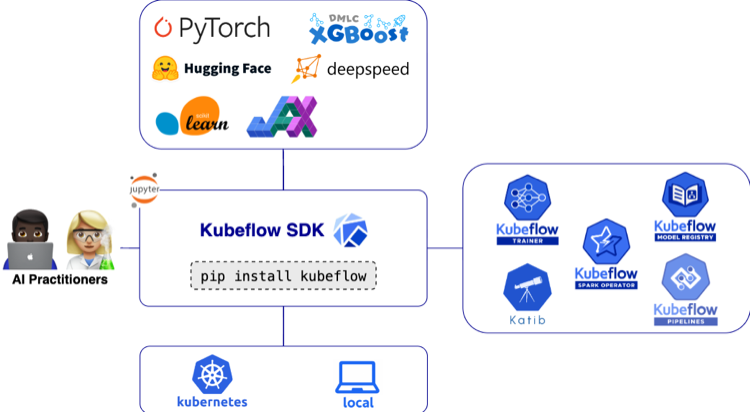
<p>The v0.4.0 release focuses on bridging the gap between data engineering, model management, and production-ready ML pipelines. The Kubeflow SDK now covers most of the MLOps lifecycle – from data processing and hyperparameter optimization to model training and registration:</p>

<p><img src="/images/2026-03-19-kubeflow-sdk-0.4.0-release/kubeflow-sdk.png" alt="Kubeflow SDK Diagram" /></p>

<p>Highlights in Kubeflow SDK v0.4.0 include:</p>

<ul>
  <li><a href="https://sdk.kubeflow.org/en/latest/hub/index.html">Model Registry Client</a> for managing model artifacts, versions, and metadata directly from the SDK.</li>
  <li><a href="https://sdk.kubeflow.org/en/latest/spark/index.html">SparkClient API</a> with SparkConnect support for interactive data processing</li>
  <li><a href="#better-isolation-with-namespaced-trainingruntimes">Namespaced TrainingRuntimes</a> for improved isolation and multi-tenant platform management</li>
  <li><a href="#furthering-parity-between-local-and-remote-execution">Dataset and Model Initializers</a> enabling better parity between local and Kubernetes execution</li>
  <li><a href="#a-new-home-for-documentation">A new Kubeflow SDK documentation website</a> with examples, and API reference</li>
  <li><a href="#required-upgrading-to-python-310">Minimum Python version updated</a> to Python 3.10 for improved security, typing, and runtime performance</li>
</ul>

<h2 id="unified-model-management-the-model-registry-client">Unified Model Management: The Model Registry Client</h2>

<p>Managing model artifacts, versions, and metadata across experiments has historically required stitching together multiple tools outside of your training code. In v0.4.0, the SDK introduces <code class="language-plaintext highlighter-rouge">ModelRegistryClient</code> – a Pythonic interface to the Kubeflow Model Registry, available under the new <code class="language-plaintext highlighter-rouge">kubeflow.hub</code> submodule.</p>

<p>The client exposes a minimal, curated API: register models, retrieve them by name and version, update their metadata, and iterate over what’s in your registry – all without leaving the SDK. It integrates directly with the Model Registry server and supports token auth and custom CA configuration for production clusters. To install the Model Registry server, see the <a href="https://www.kubeflow.org/docs/components/model-registry/installation/">installation guide</a>.</p>

<p>Install the hub extra to get started:</p>

<div class="language-bash highlighter-rouge"><div class="highlight"><pre class="highlight"><code>pip <span class="nb">install</span> <span class="s1">'kubeflow[hub]'</span>
</code></pre></div></div>

<h3 id="usage-example">Usage Example</h3>

<div class="language-python highlighter-rouge"><div class="highlight"><pre class="highlight"><code><span class="kn">from</span> <span class="nn">kubeflow.hub</span> <span class="kn">import</span> <span class="n">ModelRegistryClient</span>

<span class="n">client</span> <span class="o">=</span> <span class="n">ModelRegistryClient</span><span class="p">(</span>
    <span class="s">"https://model-registry.kubeflow.svc.cluster.local"</span><span class="p">,</span>
    <span class="n">author</span><span class="o">=</span><span class="s">"Your Name"</span><span class="p">,</span>
<span class="p">)</span>

<span class="c1"># Register a model
</span><span class="n">model</span> <span class="o">=</span> <span class="n">client</span><span class="p">.</span><span class="n">register_model</span><span class="p">(</span>
    <span class="n">name</span><span class="o">=</span><span class="s">"my-model"</span><span class="p">,</span>
    <span class="n">uri</span><span class="o">=</span><span class="s">"s3://bucket/path/to/model"</span><span class="p">,</span>
    <span class="n">version</span><span class="o">=</span><span class="s">"1.0.0"</span><span class="p">,</span>
    <span class="n">model_format_name</span><span class="o">=</span><span class="s">"pytorch"</span><span class="p">,</span>
<span class="p">)</span>

<span class="c1"># List all models
</span><span class="k">for</span> <span class="n">model</span> <span class="ow">in</span> <span class="n">client</span><span class="p">.</span><span class="n">list_models</span><span class="p">():</span>
    <span class="k">print</span><span class="p">(</span><span class="sa">f</span><span class="s">"Model: </span><span class="si">{</span><span class="n">model</span><span class="p">.</span><span class="n">name</span><span class="si">}</span><span class="s">"</span><span class="p">)</span>

<span class="c1"># Get a specific version and artifact
</span><span class="n">version</span> <span class="o">=</span> <span class="n">client</span><span class="p">.</span><span class="n">get_model_version</span><span class="p">(</span><span class="s">"my-model"</span><span class="p">,</span> <span class="s">"1.0.0"</span><span class="p">)</span>
<span class="n">artifact</span> <span class="o">=</span> <span class="n">client</span><span class="p">.</span><span class="n">get_model_artifact</span><span class="p">(</span><span class="s">"my-model"</span><span class="p">,</span> <span class="s">"1.0.0"</span><span class="p">)</span>
<span class="k">print</span><span class="p">(</span><span class="sa">f</span><span class="s">"Model URI: </span><span class="si">{</span><span class="n">artifact</span><span class="p">.</span><span class="n">uri</span><span class="si">}</span><span class="s">"</span><span class="p">)</span>
</code></pre></div></div>

<blockquote>
  <p><strong>Note:</strong> <code class="language-plaintext highlighter-rouge">list_models()</code> and <code class="language-plaintext highlighter-rouge">list_model_versions()</code> return lazy iterators backed by pagination, so only the data you consume results in API calls – making it efficient to work with large registries.</p>
</blockquote>

<h2 id="distributed-ai-data-at-scale-sparkclient--sparkconnect">Distributed AI Data at Scale: SparkClient &amp; SparkConnect</h2>

<p>Data is a fundamental piece to every AI workload, and Apache Spark has become a cornerstone technology for large-scale data processing. However, deploying and managing Spark workloads on Kubernetes has traditionally required users to work directly with Kubernetes manifests and YAML configurations – a process that can be operationally complex. In v0.4.0, the SDK introduces <code class="language-plaintext highlighter-rouge">SparkClient</code> – a high-level, Pythonic API that eliminates this complexity, allowing data engineers and ML practitioners to manage interactive and batch Spark workloads on Kubernetes without writing a single line of YAML. Backed by the Kubeflow Spark Operator (<a href="https://github.com/kubeflow/sdk/blob/main/docs/proposals/107-spark-client/README.md">KEP-107</a>), the initial version of SparkClient introduces support for interactive sessions through the SparkConnect custom resource. In future releases of the Kubeflow SDK, we will expand this support to include batch workloads as well.</p>

<p><code class="language-plaintext highlighter-rouge">SparkClient</code> supports two operational modes. In <strong>create mode</strong>, the SDK provisions a new SparkConnect interactive session on Kubernetes for you – handling CRD creation, pod scheduling, networking, and cleanup automatically. In <strong>connect mode</strong>, you point it at an existing Spark Connect server, useful for shared clusters or cross-namespace access. Either way, you get back a standard <code class="language-plaintext highlighter-rouge">SparkSession</code> and can write the same PySpark code you already know.</p>

<p>Install Kubeflow Spark support:</p>

<div class="language-bash highlighter-rouge"><div class="highlight"><pre class="highlight"><code>pip <span class="nb">install</span> <span class="s1">'kubeflow[spark]'</span>
</code></pre></div></div>

<p>To install the Spark Operator, see the <a href="https://www.kubeflow.org/docs/components/spark-operator/getting-started/">installation guide</a>.</p>

<h3 id="usage-example-1">Usage Example</h3>

<div class="language-python highlighter-rouge"><div class="highlight"><pre class="highlight"><code><span class="kn">from</span> <span class="nn">kubeflow.spark</span> <span class="kn">import</span> <span class="n">SparkClient</span><span class="p">,</span> <span class="n">Name</span>
<span class="kn">from</span> <span class="nn">kubeflow.common.types</span> <span class="kn">import</span> <span class="n">KubernetesBackendConfig</span>

<span class="n">client</span> <span class="o">=</span> <span class="n">SparkClient</span><span class="p">(</span>
    <span class="n">backend_config</span><span class="o">=</span><span class="n">KubernetesBackendConfig</span><span class="p">(</span><span class="n">namespace</span><span class="o">=</span><span class="s">"spark-test"</span><span class="p">)</span>
<span class="p">)</span>

<span class="c1"># Level 1: Minimal - use all defaults
</span><span class="n">spark</span> <span class="o">=</span> <span class="n">client</span><span class="p">.</span><span class="n">connect</span><span class="p">(</span><span class="n">options</span><span class="o">=</span><span class="p">[</span><span class="n">Name</span><span class="p">(</span><span class="s">"my-session"</span><span class="p">)])</span>
<span class="n">df</span> <span class="o">=</span> <span class="n">spark</span><span class="p">.</span><span class="nb">range</span><span class="p">(</span><span class="mi">5</span><span class="p">)</span>
<span class="n">df</span><span class="p">.</span><span class="n">show</span><span class="p">()</span>
<span class="n">client</span><span class="p">.</span><span class="n">delete_session</span><span class="p">(</span><span class="s">"my-session"</span><span class="p">)</span>

<span class="c1"># Level 2: Simple -- configure executors and resources
</span><span class="n">spark</span> <span class="o">=</span> <span class="n">client</span><span class="p">.</span><span class="n">connect</span><span class="p">(</span>
    <span class="n">num_executors</span><span class="o">=</span><span class="mi">5</span><span class="p">,</span>
    <span class="n">resources_per_executor</span><span class="o">=</span><span class="p">{</span><span class="s">"cpu"</span><span class="p">:</span> <span class="s">"5"</span><span class="p">,</span> <span class="s">"memory"</span><span class="p">:</span> <span class="s">"1Gi"</span><span class="p">},</span>
    <span class="n">spark_conf</span><span class="o">=</span><span class="p">{</span><span class="s">"spark.sql.adaptive.enabled"</span><span class="p">:</span> <span class="s">"true"</span><span class="p">},</span>
    <span class="n">options</span><span class="o">=</span><span class="p">[</span><span class="n">Name</span><span class="p">(</span><span class="s">"my-session-2"</span><span class="p">)],</span>
<span class="p">)</span>
<span class="n">df</span> <span class="o">=</span> <span class="n">spark</span><span class="p">.</span><span class="nb">range</span><span class="p">(</span><span class="mi">5</span><span class="p">)</span>
<span class="n">df</span><span class="p">.</span><span class="n">show</span><span class="p">()</span>
<span class="n">client</span><span class="p">.</span><span class="n">delete_session</span><span class="p">(</span><span class="s">"my-session-2"</span><span class="p">)</span>

<span class="c1"># Connect mode -- attach to an existing Spark Connect server
</span><span class="n">spark</span> <span class="o">=</span> <span class="n">client</span><span class="p">.</span><span class="n">connect</span><span class="p">(</span><span class="n">base_url</span><span class="o">=</span><span class="s">"sc://spark-server:15002"</span><span class="p">)</span>
<span class="n">df</span> <span class="o">=</span> <span class="n">spark</span><span class="p">.</span><span class="n">sql</span><span class="p">(</span><span class="s">"SELECT * FROM my_table"</span><span class="p">)</span>
<span class="n">df</span><span class="p">.</span><span class="n">show</span><span class="p">()</span>
</code></pre></div></div>

<p>Default specifications: Spark 4.0.1, 1 executor, 512Mi memory and 1 CPU per pod, 300 second session timeout.</p>

<blockquote>
  <p><strong>Note:</strong> v0.4.0 focuses on SparkConnect session management. Batch job support via SparkApplication CR (<code class="language-plaintext highlighter-rouge">submit_job</code>, <code class="language-plaintext highlighter-rouge">get_job</code>, <code class="language-plaintext highlighter-rouge">list_jobs</code>) is planned for a future release.</p>
</blockquote>

<h2 id="a-new-home-for-documentation">A New Home for Documentation</h2>

<p>To support the Kubeflow SDK users and contributors, we’ve introduced a dedicated <a href="https://sdk.kubeflow.org">Kubeflow SDK Website</a>. This site includes:</p>

<ul>
  <li><strong><a href="https://sdk.kubeflow.org/en/latest/getting-started/quickstart.html">Quickstart</a>:</strong> Train your first model with Kubeflow SDK</li>
  <li><strong><a href="https://sdk.kubeflow.org/en/latest/train/api.html">API Reference</a>:</strong> Automatically updated documentation for all SDK modules.</li>
  <li><strong><a href="https://sdk.kubeflow.org/en/latest/examples.html">Examples</a>:</strong> Step-by-step guides from local prototyping to remote training.</li>
</ul>

<h2 id="infrastructure--breaking-changes">Infrastructure &amp; Breaking Changes</h2>

<p>This release includes several architectural updates to ensure the SDK remains secure, scalable, and easy to use. Please note the following requirements when upgrading to v0.4.0.</p>

<h3 id="better-isolation-with-namespaced-trainingruntimes">Better Isolation with Namespaced TrainingRuntimes</h3>

<p>Security and multi-tenancy are core to Kubeflow. In v0.4.0, we’ve introduced support for <a href="https://www.kubeflow.org/docs/components/trainer/operator-guides/runtime/#what-is-trainingruntime">Namespaced TrainingRuntimes</a>. This allows platform teams to provide curated training environments at the namespace level, ensuring that one team’s custom training configuration doesn’t interfere with another’s.</p>

<p><strong>Upgrade Note:</strong> The SDK now prioritizes namespaced runtimes over cluster-wide ones. If you have runtimes with duplicate names in different scopes, verify your <code class="language-plaintext highlighter-rouge">TrainerClient</code> calls are targeting the intended resources.</p>

<h3 id="furthering-parity-between-local-and-remote-execution">Furthering Parity Between Local and Remote Execution</h3>

<p>One of the biggest hurdles in MLOps is the “it worked on my machine” syndrome. With the addition of Dataset and Model Initializers for the <code class="language-plaintext highlighter-rouge">ContainerBackend</code>, the SDK now emulates how Kubernetes handles data dependencies.</p>

<p>Whether you are running locally on Docker or at scale on a cluster, the SDK now automatically manages the “plumbing” of mounting and initializing your data. This ensures your local development environment mirrors the data-loading behavior of your production training jobs.</p>

<h3 id="required-upgrading-to-python-310">Required: Upgrading to Python 3.10+</h3>

<p>To maintain a secure and performant codebase, Kubeflow SDK v0.4.0 is officially moving its minimum requirement to <a href="https://peps.python.org/pep-0619/">Python 3.10</a>.</p>

<p>This change ensures that all SDK users benefit from better security patches, improved type-hinting, and more efficient asynchronous networking for our API clients.</p>

<p><strong>To Upgrade:</strong> Ensure your local environment, Notebook images, and CI/CD pipelines are running Python 3.10 or higher before running <code class="language-plaintext highlighter-rouge">pip install --upgrade kubeflow</code></p>

<h2 id="whats-next-for-kubeflow-sdk">What’s Next for Kubeflow SDK</h2>

<p>Looking ahead, the Kubeflow SDK <a href="https://github.com/kubeflow/sdk/pull/326">2026 Roadmap</a> outlines several exciting initiatives:</p>

<ul>
  <li><strong>Kubeflow MCP Server</strong> to enable AI-assisted interactions with Kubeflow resources</li>
  <li><strong>OpenTelemetry integration</strong> for improved observability across SDK operations</li>
  <li><strong>MLflow support</strong> for experiment tracking and metrics</li>
  <li><strong>First class support for Kubeflow Pipelines</strong> to bring KFP into the unified SDK</li>
  <li><strong>TrainJob checkpointing and dynamic LLM Trainers</strong> for more flexible and resilient training workflows</li>
  <li><strong>End-to-end AI pipelines</strong> orchestrating data processing, training, and optimization using SparkClient, TrainerClient, and OptimizerClient</li>
  <li><strong>Multi-cluster job submission</strong> leveraging Kueue and Multi-Kueue capabilities for Spark and training workloads</li>
  <li><strong>Batch Spark job support</strong> via SparkApplication CR for submit, get, and list operations</li>
</ul>

<p>We encourage the community to review and contribute to the roadmap.</p>

<h2 id="get-involved">Get Involved!</h2>

<p>The Kubeflow SDK is built by and for the community. We welcome contributions, feedback, and participation from everyone! We want to thank the community for their contributions to this release. We invite you to:</p>

<ul>
  <li><strong>Try it out:</strong> <code class="language-plaintext highlighter-rouge">pip install kubeflow==0.4.0</code></li>
  <li><strong>Contribute:</strong>
    <ul>
      <li>Read the <a href="https://github.com/kubeflow/sdk/blob/main/CONTRIBUTING.md">Contributing Guide</a>.</li>
      <li>Browse the <a href="https://github.com/kubeflow/sdk/issues?q=is%3Aissue+is%3Aopen+label%3A%22good+first+issue%22">good first issues</a></li>
      <li>Explore the <a href="https://github.com/kubeflow/sdk">GitHub Repository</a></li>
    </ul>
  </li>
</ul>

<p><strong>Connect with the Community:</strong></p>
<ul>
  <li>Join <a href="https://cloud-native.slack.com/archives/C08KJBVDH5H">#kubeflow-sdk</a> on <a href="https://www.kubeflow.org/docs/about/community/#kubeflow-slack-channels">CNCF Slack</a></li>
  <li>Attend the <a href="https://www.kubeflow.org/docs/about/community/#kubeflow-community-calendars">Kubeflow SDK and ML Experience WG meetings</a></li>
</ul>

<p><strong>Learn More</strong></p>
<ul>
  <li>Visit the <a href="https://sdk.kubeflow.org">Kubeflow SDK Website</a></li>
  <li>View the full <a href="https://github.com/kubeflow/sdk/releases/tag/0.4.0">Changelog</a>.</li>
</ul>

<p><strong>Headed to <a href="https://events.linuxfoundation.org/kubecon-cloudnativecon-europe/">KubeCon + CloudNativeCon 2026 EU</a>?</strong> Stop by the Kubeflow booth to see these features in action!</p>]]></content><author><name>Kubeflow SDK Team</name></author><category term="release" /><category term="sdk" /><summary type="html"><![CDATA[Explore the full documentation at sdk.kubeflow.org]]></summary></entry><entry><title type="html">Introducing the Metaflow-Kubeflow Integration</title><link href="https://blog.kubeflow.org/metaflow/" rel="alternate" type="text/html" title="Introducing the Metaflow-Kubeflow Integration" /><published>2026-02-04T00:00:00+00:00</published><updated>2026-02-04T00:00:00+00:00</updated><id>https://blog.kubeflow.org/introducing-metaflow-kubeflow-integration</id><content type="html" xml:base="https://blog.kubeflow.org/metaflow/"><![CDATA[<h1 id="a-tale-of-two-flows-metaflow-and-kubeflow">A tale of two flows: Metaflow and Kubeflow</h1>

<p>Metaflow is a Python framework for building and operating ML and AI projects, originally developed and open-sourced by Netflix in 2019. In many ways, Kubeflow and Metaflow are cousins: closely related in spirit, but designed with distinct goals and priorities.</p>

<p><a href="https://docs.metaflow.org/">Metaflow</a> emerged from Netflix’s need to empower data scientists and ML/AI developers with developer-friendly, Python-native tooling, so that they could easily iterate quickly on ideas, compare modeling approaches, and ship the best solutions to production without heavy engineering or DevOps involvement. On the infrastructure side, Metaflow started with AWS-native services like AWS Batch and Step Functions, later expanding to provide first-class support for the Kubernetes ecosystem and other hyperscaler clouds.</p>

<p>In contrast, Kubeflow began as a set of Kubernetes operators for distributed TensorFlow and Jupyter Notebook management. Over time, it has evolved into a comprehensive Cloud Native AI ecosystem, offering a broad set of tools out of the box. These include Trainer, Katib, Spark Operator for orchestrating distributed AI workloads, Workspaces for interactive development environments, Hub for AI catalog and artifacts management, KServe for model serving, and Pipelines to deploy end-to-end ML workflows and stitching Kubeflow components together.</p>

<p>Over the years, Metaflow has delighted end users with its intuitive APIs, while Kubeflow has delivered tons of value to infrastructure teams through its robust platform components. This complementary nature of the tools motivated us to build a bridge between the two: <a href="https://docs.metaflow.org/production/scheduling-metaflow-flows/scheduling-with-kubeflow">you can now author projects in Metaflow and deploy them as Kubeflow Pipelines</a>, side by side with your existing Kubeflow workloads.</p>

<h1 id="why-metaflow--kubeflow">Why Metaflow → Kubeflow</h1>

<p>In <a href="https://www.cncf.io/wp-content/uploads/2025/11/cncf_report_techradar_111025a.pdf">the most recent CNCF Technology Radar survey</a> from October 2025, Metaflow got the highest positive scores in the “<em>likelihood to recommend</em>” and “<em>usefulness</em>” categories, reflecting its success in providing a set of stable, productivity-boosting APIs for ML/AI developers.</p>

<p>Metaflow spans the entire development lifecycle—from early experimentation to production deployment and ongoing operations. To give you an idea, the core features below illustrate the breadth of its API surface, grouped by project stage:</p>

<h2 id="development">Development</h2>

<ul>
  <li>
    <p>Straightforward APIs for <a href="https://docs.metaflow.org/metaflow/basics">creating and composing workflows</a>.</p>
  </li>
  <li>
    <p>Automated state transfer and management through <a href="https://docs.metaflow.org/metaflow/basics#artifacts">artifacts</a>, allowing you to <a href="https://docs.metaflow.org/metaflow/authoring-flows/introduction">build flows incrementally</a> and resume them freely (see <a href="https://netflixtechblog.com/supercharging-the-ml-and-ai-development-experience-at-netflix-b2d5b95c63eb">a recent article by Netflix</a> about the topic)</p>
  </li>
  <li>
    <p>Interactive, <a href="https://docs.metaflow.org/metaflow/basics">real-time visual outputs</a> from tasks through cards - a perfect substrate for <a href="https://outerbounds.com/blog/visualize-everything-with-ai">custom observability solutions, created quickly with AI copilots</a>.</p>
  </li>
  <li>
    <p>Choose the right balance between code and configuration through <a href="https://docs.metaflow.org/metaflow/configuring-flows/introduction">built-in configuration management</a>.</p>
  </li>
  <li>
    <p>Create domain-specific abstractions and project-level policies through <a href="https://docs.metaflow.org/metaflow/composing-flows/introduction">custom decorators</a>.</p>
  </li>
</ul>

<h2 id="scaling">Scaling</h2>

<ul>
  <li>
    <p><a href="https://docs.metaflow.org/scaling/remote-tasks/introduction">Scale flows horizontally and vertically</a>: Both task and data parallelism are supported.</p>
  </li>
  <li>
    <p><a href="https://docs.metaflow.org/scaling/failures">Handle failures gracefully</a>.</p>
  </li>
  <li>
    <p><a href="https://docs.metaflow.org/scaling/dependencies">Package dependencies automatically</a> with support for Conda, PyPI, and uv.</p>
  </li>
  <li>
    <p>Leverage <a href="https://docs.metaflow.org/scaling/remote-tasks/distributed-computing">distributed computing paradigms</a> such as Ray, MPI, and Torch Distributed.</p>
  </li>
  <li>
    <p><a href="https://docs.metaflow.org/scaling/checkpoint/introduction">Checkpoint long-running tasks</a> and manage checkpoints consistently.</p>
  </li>
</ul>

<h2 id="deployment">Deployment</h2>

<ul>
  <li>
    <p>Maintain a clear separation between experimentation, production, and individual developers through <a href="https://docs.metaflow.org/scaling/tagging">namespaces</a>.</p>
  </li>
  <li>
    <p>Adopt CI/CD and GitOps best practices through <a href="https://docs.metaflow.org/production/coordinating-larger-metaflow-projects">branching</a>.</p>
  </li>
  <li>
    <p><a href="https://docs.metaflow.org/production/event-triggering">Compose large, reactive systems</a> through isolated sub-flows with event triggering.</p>
  </li>
</ul>

<p>These features provide a unified, user-facing API for the capabilities required by real-world ML and AI systems. Behind the scenes, Metaflow is built on integrations with production-quality infrastructure, effectively acting as a user-interface layer over platforms like Kubernetes - and now, Kubeflow. The diagram below illustrates the division of responsibilities:
<img style="max-width: 100%; height: auto; display: block;" alt="kubeflow-metaflow-arch" src="https://github.com/user-attachments/assets/88f4af4e-7e27-4287-b275-88e4b1b87449" /></p>

<p>The key benefit of the Metaflow–Kubeflow integration is that it allows organizations to <strong>keep their existing Kubernetes and Kubeflow infrastructure intact, while upgrading the developer experience with higher-level abstractions and additional functionality, provided by Metaflow.</strong></p>

<p>Currently, the integration supports deploying Metaflow flows as Kubeflow Pipelines. Once you have Metaflow tasks running on Kubernetes, you can access other components such as Katib and Trainer from Metaflow tasks through their Python clients as usual.</p>

<h1 id="metaflow--kubeflow-in-practice">Metaflow → Kubeflow in practice</h1>

<p>As the integration requires no changes in your existing Kubeflow infrastructure, it is straightforward to get started. You can <a href="https://docs.metaflow.org/getting-started/infrastructure">deploy Metaflow in an existing cloud account</a> (GCP, Azure, or AWS) or you can <a href="https://docs.metaflow.org/getting-started/devstack">install the dev stack on your laptop</a> with a single command.</p>

<p>Once you have Metaflow and Kubeflow running independently, you can install the extension providing the integration (you can <a href="https://docs.metaflow.org/production/scheduling-metaflow-flows/scheduling-with-kubeflow">follow instructions in the documentation</a>):</p>

<div class="language-plaintext highlighter-rouge"><div class="highlight"><pre class="highlight"><code>pip install metaflow-kubeflow
</code></pre></div></div>

<p>The only configuration needed is to point Metaflow at your Kubeflow Pipelines service, either by adding the following line in the Metaflow config or by setting it as an environment variable:</p>

<div class="language-plaintext highlighter-rouge"><div class="highlight"><pre class="highlight"><code>METAFLOW_KUBEFLOW_PIPELINES_URL = "http://my-kubeflow"
</code></pre></div></div>

<p>After this, you can author a Metaflow flow as usual and test it locally:</p>

<div class="language-plaintext highlighter-rouge"><div class="highlight"><pre class="highlight"><code>python flow.py run
</code></pre></div></div>

<p>which runs the flow quickly as local processes. If everything looks good, you can deploy the flow as a Kubeflow pipeline:</p>

<div class="language-plaintext highlighter-rouge"><div class="highlight"><pre class="highlight"><code>python flow.py kubeflow-pipelines create
</code></pre></div></div>

<p>This will package all the source code and dependencies of the flow automatically, compile the Metaflow flow into a Kubeflow Pipelines YAML and deploy it to Kubeflow, which you can see alongside your existing pipelines in the Kubeflow UI. The following screencast shows the process in action:</p>

<p><a href="https://www.youtube.com/watch?v=ALg0A9SzRG8"><img src="https://i.ytimg.com/vi/ALg0A9SzRG8/maxresdefault.jpg" alt="" /></a></p>

<p>The integration doesn’t have 100% feature coverage yet: Some Metaflow features such as <a href="https://docs.metaflow.org/metaflow/basics#conditionals">conditional</a> and <a href="https://docs.metaflow.org/metaflow/basics#recursion">recursive</a> steps are not yet supported. In future versions, we may also provide additional convenience APIs for other Kubeflow components, such as KServe - or you can easily implement them by yourself as <a href="https://docs.metaflow.org/metaflow/composing-flows/custom-decorators">custom decorators</a> with the <a href="https://sdk.kubeflow.org/en/latest/">Kubeflow SDK</a>!</p>

<p>If you want to learn more about the integration, you can watch <a href="https://www.youtube.com/watch?v=YDKRIiQNMU0">an announcement webinar</a> on Youtube.</p>

<h1 id="feedback-welcome">Feedback welcome!</h1>

<p>Like Kubeflow, Metaflow is an open-source project actively developed by multiple organizations — including Netflix, which maintains a dedicated team working on Metaflow, and <a href="https://outerbounds.com">Outerbounds, which provides a managed Metaflow platform</a> deployed in customers’ own cloud environments.</p>

<p>The Metaflow community convenes at <a href="http://slack.outerbounds.co">the Metaflow Slack</a>. We welcome you to join, ask questions, and give feedback about the Kubeflow integration, and share your wishlist items for the roadmap. We are looking forward to a fruitful collaboration between the two communities!</p>]]></content><author><name>{&quot;name&quot;=&gt;&quot;&quot;, &quot;email&quot;=&gt;&quot;&quot;}</name></author><category term="community" /><summary type="html"><![CDATA[A tale of two flows: Metaflow and Kubeflow]]></summary></entry><entry><title type="html">Kubeflow AI Reference Platform 1.11 Release Announcement</title><link href="https://blog.kubeflow.org/kubeflow-1.11-release/" rel="alternate" type="text/html" title="Kubeflow AI Reference Platform 1.11 Release Announcement" /><published>2025-12-22T00:00:00+00:00</published><updated>2025-12-22T00:00:00+00:00</updated><id>https://blog.kubeflow.org/kubeflow-1.11-release</id><content type="html" xml:base="https://blog.kubeflow.org/kubeflow-1.11-release/"><![CDATA[<p>Kubeflow AI Reference Platform 1.11 delivers substantial platform improvements focused on scalability, security, and operational efficiency. The release reduces per namespace overhead, strengthens multi-tenant defaults, and improves overall reliability for running Kubeflow at scale on Kubernetes.</p>

<h2 id="highlight-features">Highlight features</h2>

<ul>
  <li>Trainer v2.1.0 with unified TrainJob API, Python-first workflows, and built-in LLM fine-tuning support</li>
  <li>Multi-tenant S3 storage with per-namespace credentials, with SeaweedFS replacing MinIO as the default backend</li>
  <li>Massive scalability improvements enabling Kubeflow deployments to scale to 1,000+ users, profiles, and namespaces</li>
  <li>Zero pod overhead by default for namespaces and profiles, significantly reducing baseline resource consumption</li>
  <li>Optimized Istio service mesh configuration to dramatically reduce sidecar memory usage and network traffic in large clusters</li>
  <li>Stronger security defaults with Pod Security Standards (restricted for system namespaces, baseline for user namespaces)</li>
  <li>Improved authentication and exposure patterns for KServe inference services, with automated tests and documentation</li>
  <li>Expanded Helm chart support (experimental) to improve modularity and deployment flexibility</li>
  <li>Updates across core components, including Kubeflow Pipelines, Katib, KServe, Model Registry, Istio, and Spark Operator</li>
</ul>

<h2 id="kubeflow-platform-manifests--security">Kubeflow Platform (Manifests &amp; Security)</h2>

<p>The Kubeflow Platform Working Group focuses on simplifying Kubeflow installation, operations, and security. See details below.</p>

<h3 id="manifests">Manifests:</h3>

<ul>
  <li><a href="https://github.com/kubeflow/manifests/blob/master/README.md">Documentation updates</a> that make it easier to install,
extend and upgrade Kubeflow</li>
  <li>For more details and future plans please check <a href="https://github.com/kubeflow/manifests/issues/3038">1.12.0</a> roadmap.</li>
</ul>

<table>
  <thead>
    <tr>
      <th style="text-align: center">Notebooks</th>
      <th style="text-align: center">Dashboard</th>
      <th style="text-align: center">Pipelines</th>
      <th style="text-align: center">Katib</th>
      <th style="text-align: center">Trainer</th>
      <th style="text-align: center">KServe</th>
      <th style="text-align: center">Model Registry</th>
      <th style="text-align: center">Spark</th>
    </tr>
  </thead>
  <tbody>
    <tr>
      <td style="text-align: center"><a href="https://github.com/kubeflow/kubeflow/issues/7459">1.10</a></td>
      <td style="text-align: center"><a href="https://github.com/kubeflow/kubeflow/releases/tag/v1.10.0">1.10</a></td>
      <td style="text-align: center"><a href="https://github.com/kubeflow/pipelines/releases/tag/2.15.2">2.15.2</a></td>
      <td style="text-align: center"><a href="https://github.com/kubeflow/katib/releases/tag/v0.19.0">0.19.0</a></td>
      <td style="text-align: center"><a href="https://github.com/kubeflow/trainer/releases/tag/v2.1.0">2.1.0</a></td>
      <td style="text-align: center"><a href="https://github.com/kserve/kserve/releases/tag/v0.15.2">0.15.2</a></td>
      <td style="text-align: center"><a href="https://github.com/kubeflow/model-registry/releases/tag/v0.3.4">0.3.4</a></td>
      <td style="text-align: center"><a href="https://github.com/kubeflow/spark-operator/releases/tag/v2.4.0">2.4.0</a></td>
    </tr>
  </tbody>
</table>

<table>
  <thead>
    <tr>
      <th style="text-align: center">Kubernetes</th>
      <th style="text-align: center">Kind</th>
      <th style="text-align: center">Kustomize</th>
      <th style="text-align: center">Cert Manager</th>
      <th style="text-align: center">Knative</th>
      <th style="text-align: center">Istio</th>
      <th style="text-align: center">Dex</th>
      <th style="text-align: center">OAuth2-proxy</th>
    </tr>
  </thead>
  <tbody>
    <tr>
      <td style="text-align: center">1.33+</td>
      <td style="text-align: center">0.30.0</td>
      <td style="text-align: center">5.7.1</td>
      <td style="text-align: center">1.16.1</td>
      <td style="text-align: center">1.20</td>
      <td style="text-align: center">1.28</td>
      <td style="text-align: center">2.43</td>
      <td style="text-align: center">7.10</td>
    </tr>
  </tbody>
</table>

<h3 id="security">Security:</h3>

<ul>
  <li><strong>Pod Security Standards enforced by default</strong>:
    <ul>
      <li><code class="language-plaintext highlighter-rouge">restricted</code> for all Kubeflow system namespaces<br />
(<a href="https://github.com/kubeflow/manifests/pull/3190">#3190</a>, <a href="https://github.com/kubeflow/manifests/pull/3050">#3050</a>)</li>
      <li><code class="language-plaintext highlighter-rouge">baseline</code> for user namespaces<br />
(<a href="https://github.com/kubeflow/manifests/pull/3204">#3204</a>, <a href="https://github.com/kubeflow/manifests/pull/3220">#3220</a>)</li>
    </ul>
  </li>
  <li><strong>Network policies enabled by default</strong> for critical system namespaces<br />
(<code class="language-plaintext highlighter-rouge">knative-serving</code>, <code class="language-plaintext highlighter-rouge">oauth2-proxy</code>, <code class="language-plaintext highlighter-rouge">cert-manager</code>, <code class="language-plaintext highlighter-rouge">istio-system</code>, <code class="language-plaintext highlighter-rouge">auth</code>)<br />
(<a href="https://github.com/kubeflow/manifests/pull/3228">#3228</a>)</li>
  <li><strong>Improved multi-tenant isolation for object storage</strong>, with per-namespace S3 credentials<br />
(<a href="https://github.com/kubeflow/manifests/pull/3240">#3240</a>)</li>
  <li><strong>Authentication enforcement for KServe inference services</strong><br />
(<a href="https://github.com/kubeflow/manifests/pull/3180">#3180</a>)</li>
</ul>

<p>Trivy CVE scans December 15 2025:</p>

<table>
  <thead>
    <tr>
      <th style="text-align: center">Working Group</th>
      <th style="text-align: center">Images</th>
      <th style="text-align: center">Critical CVE</th>
      <th style="text-align: center">High CVE</th>
      <th style="text-align: center">Medium CVE</th>
      <th style="text-align: center">Low CVE</th>
    </tr>
  </thead>
  <tbody>
    <tr>
      <td style="text-align: center">Katib</td>
      <td style="text-align: center">18</td>
      <td style="text-align: center">1</td>
      <td style="text-align: center">35</td>
      <td style="text-align: center">158</td>
      <td style="text-align: center">562</td>
    </tr>
    <tr>
      <td style="text-align: center">Pipelines</td>
      <td style="text-align: center">15</td>
      <td style="text-align: center">12</td>
      <td style="text-align: center">432</td>
      <td style="text-align: center">1051</td>
      <td style="text-align: center">1558</td>
    </tr>
    <tr>
      <td style="text-align: center">Workbenches(Notebooks)</td>
      <td style="text-align: center">12</td>
      <td style="text-align: center">39</td>
      <td style="text-align: center">312</td>
      <td style="text-align: center">525</td>
      <td style="text-align: center">267</td>
    </tr>
    <tr>
      <td style="text-align: center">Kserve</td>
      <td style="text-align: center">16</td>
      <td style="text-align: center">35</td>
      <td style="text-align: center">535</td>
      <td style="text-align: center">11929</td>
      <td style="text-align: center">1745</td>
    </tr>
    <tr>
      <td style="text-align: center">Manifests</td>
      <td style="text-align: center">15</td>
      <td style="text-align: center">6</td>
      <td style="text-align: center">105</td>
      <td style="text-align: center">256</td>
      <td style="text-align: center">55</td>
    </tr>
    <tr>
      <td style="text-align: center">Trainer</td>
      <td style="text-align: center">9</td>
      <td style="text-align: center">4</td>
      <td style="text-align: center">157</td>
      <td style="text-align: center">9012</td>
      <td style="text-align: center">728</td>
    </tr>
    <tr>
      <td style="text-align: center">Model Registry</td>
      <td style="text-align: center">3</td>
      <td style="text-align: center">3</td>
      <td style="text-align: center">75</td>
      <td style="text-align: center">132</td>
      <td style="text-align: center">36</td>
    </tr>
    <tr>
      <td style="text-align: center">Spark</td>
      <td style="text-align: center">1</td>
      <td style="text-align: center">4</td>
      <td style="text-align: center">22</td>
      <td style="text-align: center">1688</td>
      <td style="text-align: center">151</td>
    </tr>
    <tr>
      <td style="text-align: center">All Images</td>
      <td style="text-align: center">89</td>
      <td style="text-align: center">104</td>
      <td style="text-align: center">1673</td>
      <td style="text-align: center">24751</td>
      <td style="text-align: center">5102</td>
    </tr>
  </tbody>
</table>

<h2 id="pipelines">Pipelines</h2>

<p>This release of KFP introduces several notable changes that users should consider prior to upgrading. Comprehensive upgrade and documentation notes will follow shortly. In the interim, please note the following key modifications</p>

<h3 id="default-object-store-update">Default object store update</h3>

<p>Kubeflow Pipelines now defaults to SeaweedFS for the object store deployment, replacing the previous default of MinIO.
MinIO remains fully supported, as does any S3-compatible object storage backend, only the default deployment configuration has changed.</p>

<p>Existing MinIO manifests are still available for users who wish to continue using MinIO, though these legacy manifests may be removed in future releases. Users with existing data are advised to back up and restore as needed when switching object store backends.</p>

<h3 id="database-backend-upgrade">Database backend upgrade</h3>

<p>This release includes a major upgrade to the Gorm database backend, which introduces an automated database index migration for users upgrading from versions prior to 2.15.0.
Because this migration does not support rollback, it is strongly recommended that production databases be backed up before performing the upgrade.</p>

<h2 id="model-registry">Model Registry</h2>

<p>Model Registry continues to mature with new capabilities for model discovery, governance, and deeper integration with the Kubeflow ecosystem.</p>

<h3 id="model-registry-ui">Model Registry UI</h3>

<p>The user-friendly web interface for centralized model metadata, version tracking, and artifact management now supports filtering, sorting, archiving, custom metadata, and metadata editing making it easier for teams to organize and govern their model lifecycle.</p>

<h3 id="model-catalog">Model Catalog</h3>

<p>A new Model Catalog feature enables model discovery and sharing with governance controls.
A <a href="https://github.com/kubeflow/community/blob/master/proposals/907-model-registry-renaming/README.md#model-catalog-cluster-scoped-company-scoped">Model Catalog</a> is a pattern where an organisation can define their validated and approved models, enabling discovery and sharing across teams, while at the same time ensuring model governance and compliance.
Admin can define a number of catalog sources, filtering and enable model visibility, including Hugging Face.
Teams can discover and use approved models from the organisation’s catalog.
The catalog UI and backend are under active development.</p>

<h3 id="kserve-integration">KServe Integration</h3>

<ul>
  <li><strong>Custom Storage Initializer (CSI)</strong>  Enables model download and deployment using model metadata directly from the Registry.</li>
  <li><strong>Reconciliation loop</strong>  A deployable Kubernetes controller which observes KServe InferenceServices to automatically populate Model Registry logical-model records, keeping registry audit records of live deployments.</li>
</ul>

<h3 id="storage-integrations">Storage Integrations</h3>

<ul>
  <li><strong>Python client workflows</strong>  Data scientists can leverage convenience functions in the Python client to <a href="https://model-registry.readthedocs.io/en/latest/#uploading-local-models-to-external-storage-and-registering-them">package, store, and register models and their metadata</a> in a single playbook.</li>
  <li><strong>Async Upload Job</strong>  A Kubernetes Job for transferring and packaging models (including KServe ModelCar OCI Image format), simplifying model storage operations in production environments, leveraging scaling and orchestration capabilities of Kubernetes without additional dependencies.</li>
</ul>

<h3 id="additional-improvements">Additional Improvements</h3>

<ul>
  <li>Removal of the legacy Google MLMD dependency.</li>
  <li>PostgreSQL support alongside MySQL.</li>
  <li>Multi-architecture container builds (amd64/arm64).</li>
  <li>SBOM generation for container builds and OpenSSF Scorecard CI integration.</li>
</ul>

<h2 id="training-operator-trainer--katib">Training Operator (Trainer) &amp; Katib</h2>

<p>Kubeflow 1.11 includes Trainer v2.1.0, a major architectural evolution that simplifies distributed training on Kubernetes with a unified API, Python-first workflows, and enhanced LLM fine-tuning capabilities.</p>

<h3 id="new-api-architecture">New API Architecture</h3>

<p>Kubeflow Trainer v2 introduces <strong>TrainJob</strong>  a unified training job API that replaces framework-specific CRDs (PyTorchJob, TFJob, etc.). Infrastructure configuration is now separated into <strong>TrainingRuntime</strong> and <strong>ClusterTrainingRuntime</strong> resources, creating a clean boundary between platform engineering (runtime setup) and data science (job submission).</p>

<h3 id="python-first-experience">Python-First Experience</h3>

<ul>
  <li><strong>No YAML required</strong>  Install with <code class="language-plaintext highlighter-rouge">pip install kubeflow</code> and submit jobs directly from Python notebooks or scripts.</li>
  <li><strong>Local execution mode</strong>  Develop and test training code locally without a Kubernetes cluster before scaling to production.</li>
  <li><strong>Helm Charts</strong>  Deploy with <code class="language-plaintext highlighter-rouge">helm install kubeflow-trainer oci://ghcr.io/kubeflow/charts/kubeflow-trainer --version 2.1.0</code>.</li>
</ul>

<h3 id="llm-fine-tuning">LLM Fine-Tuning</h3>

<p>Built-in support for large language model fine-tuning workflows:</p>
<ul>
  <li>TorchTune trainer with pre-configured runtimes for Llama 3.2, Qwen 2.5, and more.</li>
  <li>LoRA, QLoRA, and DoRA for parameter-efficient fine-tuning.</li>
  <li>Dataset and model initializers for HuggingFace and S3 storage.</li>
</ul>

<h3 id="distributed-ai-data-cache">Distributed AI Data Cache</h3>

<p>Optional in-memory cache cluster (powered by <a href="https://arrow.apache.org/">Apache Arrow</a> and <a href="https://datafusion.apache.org/">Apache DataFusion</a> ) streams datasets directly to GPU nodes with zero-copy transfers, maximizing GPU utilization and minimizing I/O wait times for large-scale training workloads. More details can be found <a href="https://www.kubeflow.org/docs/components/trainer/user-guides/data-cache/">here</a>.</p>

<h3 id="scheduler-integrations">Scheduler Integrations</h3>

<ul>
  <li><strong>Kueue</strong>  Topology-aware scheduling and multi-cluster job dispatching for TrainJobs, enabling optimal placement for distributed training across node groups.</li>
  <li><strong>Volcano</strong>  Gang-scheduling support with PodGroup integration.</li>
  <li><strong>MPI</strong>  First-class support for MPI-based distributed training workloads on Kubernetes.</li>
</ul>

<h3 id="katib">Katib</h3>

<p>Katib hyperparameter tuning remains compatible with Trainer v2, allowing users to optimize model hyperparameters alongside the new training workflow.</p>

<p>A major addition is the integration with Kubeflow SDK (<a href="https://github.com/kubeflow/sdk/tree/main/docs/proposals/46-hyperparameter-optimization">KEP-46</a>, <a href="https://github.com/kubeflow/sdk/pull/124">PR #124</a>). The new <code class="language-plaintext highlighter-rouge">OptimizerClient</code> allows users to define and run hyperparameter experiments directly from Python notebooks without writing YAML. You can configure search spaces, objectives, and algorithms using <code class="language-plaintext highlighter-rouge">OptimizerClient().optimize()</code>. Each trial runs as a TrainJob with different hyperparameter values, and training code can report metrics using simple Python functions. The client includes standard methods for managing jobs: <code class="language-plaintext highlighter-rouge">create_job()</code>, <code class="language-plaintext highlighter-rouge">get_job()</code>, <code class="language-plaintext highlighter-rouge">list_jobs()</code>, and <code class="language-plaintext highlighter-rouge">delete_job()</code>.</p>

<h2 id="spark-operator">Spark Operator</h2>

<p>The Spark Operator has received broad improvements in Kubeflow 1.11, spanning Spark version support, workload management, scheduling, and operational simplicity.</p>

<h3 id="broader-spark-support">Broader Spark Support</h3>

<p>The operator now supports Apache Spark 4 and introduces Spark Connect, enabling modern client–server Spark interactions. This allows users to connect to Spark sessions remotely and improves compatibility with the evolving Spark ecosystem.</p>

<h3 id="workload-management--scheduling">Workload Management &amp; Scheduling</h3>

<ul>
  <li><strong>Suspend / Resume SparkApplications</strong>  Users can now suspend and resume jobs, giving greater control over workload lifecycle.</li>
  <li><strong>Kueue integration</strong>  Integration with <a href="https://kueue.sigs.k8s.io/">Kueue</a> enables queue-based workload management and fair sharing of cluster resources across teams.</li>
  <li><strong>Enhanced dynamic allocation</strong>  Improved shuffle tracking and dynamic allocation controls for more efficient resource usage.</li>
</ul>

<h3 id="operations--security">Operations &amp; Security</h3>

<ul>
  <li><strong>Automatic CRD upgrades</strong>  Helm hooks now handle CRD upgrades automatically, reducing manual steps during upgrades.</li>
  <li><strong>Deprecation of sparkctl</strong>  Legacy <code class="language-plaintext highlighter-rouge">sparkctl</code> has been deprecated in favor of kubectl-native workflows.</li>
  <li><strong>Flexible Ingress &amp; cert-manager support</strong>  More configurable Ingress (TLS, annotations, URL patterns) and simplified certificate handling via cert-manager.</li>
</ul>

<h3 id="observability">Observability</h3>

<ul>
  <li><strong>Structured logging</strong>  Configurable JSON and console log output formats.</li>
  <li><strong>Better validation</strong>  Stricter validation of SparkApplication names and specs, catching misconfigurations earlier.</li>
</ul>

<h2 id="kserve">KServe</h2>

<p>KServe in Kubeflow 1.11 delivers major improvements across model serving, inference capabilities, and operational maturity.</p>

<h3 id="multi-node-inference">Multi-Node Inference</h3>

<p>KServe now supports multi-node inference, enabling large models to be distributed across multiple nodes using Ray-based serving runtimes. This is critical for deploying very large language models that exceed single-node GPU capacity.</p>

<h3 id="model-cache-improvements">Model Cache Improvements</h3>

<p>The Model Cache feature, introduced in v0.14, has been significantly hardened. Fixes include correct URI matching, protection against cache mismatches, support for multiple node groups, and PVC/PV retention after InferenceService deletion making model caching more reliable for production use.</p>

<h3 id="keda-autoscaling-integration">KEDA Autoscaling Integration</h3>

<p>KServe introduces integration with <a href="https://keda.sh/">KEDA</a> for event-driven autoscaling, including an external scaler implementation. This gives users more flexible scaling options beyond the built-in Knative and HPA-based autoscalers.</p>

<h3 id="gateway-api-support">Gateway API Support</h3>

<p>Raw deployment mode now supports the Kubernetes Gateway API, providing a modern, standardized alternative to Ingress for routing inference traffic.</p>

<h3 id="vllm--hugging-face-runtime-updates">vLLM &amp; Hugging Face Runtime Updates</h3>

<ul>
  <li>Upgraded vLLM to v0.8.1+ with support for reasoning models, tool calling, embeddings, reranking, and Llama 4 / Qwen 3.</li>
  <li>vLLM V1 engine support and CPU inference via Intel Extension for PyTorch.</li>
  <li>LMCache integration with vLLM for improved KV cache reuse.</li>
  <li>Hugging Face runtime updates include 4-bit quantization support (bitsandbytes), speculative decoding, and deprecation of OpenVINO support.</li>
</ul>

<h3 id="inference-graph-enhancements">Inference Graph Enhancements</h3>

<ul>
  <li>InferenceGraphs now support pod spec fields (affinity, tolerations, resources) and well-known labels.</li>
  <li>Improved Istio mesh compatibility and fixed response codes for conditional routing steps.</li>
</ul>

<h3 id="operational--security-improvements">Operational &amp; Security Improvements</h3>

<ul>
  <li>ModelCar (OCI-based model loading) enabled by default.</li>
  <li>Collocation of transformer and predictor containers in a single pod.</li>
  <li>Stop-and-resume model serving via annotations (serverless mode).</li>
  <li>Configurable label and annotation propagation to serving pods.</li>
  <li>SBOM generation and third-party license inclusion for all images.</li>
  <li>Multiple CVE fixes including <code class="language-plaintext highlighter-rouge">CVE-2025-43859</code> and <code class="language-plaintext highlighter-rouge">CVE-2025-24357</code>.</li>
</ul>

<h2 id="kubeflow-sdk">Kubeflow SDK</h2>

<p>Kubeflow 1.11 is the first AI Reference Platform release where users can simply <code class="language-plaintext highlighter-rouge">pip install kubeflow</code> to start working with AI workloads, no Kubernetes expertise required. The <a href="https://sdk.kubeflow.org/en/latest/">Kubeflow SDK</a> provides a unified Python interface to train models, run hyperparameter tuning, and manage model artifacts across the Kubeflow ecosystem. It also enables local development without a Kubernetes cluster, so users can iterate on their training code locally before scaling to production. For documentation and examples, visit <a href="https://sdk.kubeflow.org/en/latest/">sdk.kubeflow.org</a>.</p>

<h2 id="dashboard-and-notebooks">Dashboard and Notebooks</h2>

<p>The Kubeflow Central Dashboard and Notebooks remain at version 1.10 in this release, providing stable and reliable experiences. Stay tuned for interesting updates in upcoming Kubeflow AI Reference Platform releases.</p>

<h2 id="how-to-get-started-with-111">How to get started with 1.11</h2>

<p>Visit the Kubeflow AI Reference Platform 1.11 <a href="https://github.com/kubeflow/manifests/releases">release page</a> or head over to the Getting Started and Support pages.</p>

<h2 id="join-the-community">Join the Community</h2>

<p>We would like to thank everyone who contributed to Kubeflow 1.11, and especially Valentina Rodriguez Sosa for her work as the v1.11 Release Manager. We also extend our thanks to the entire release team and the working group leads, who continuously and generously dedicate their time and expertise to Kubeflow.</p>

<p>Release team members : Valentina Rodriguez Sosa, Anya Kramar, Tarek Abouzeid, Andy Stoneberg, Humair Khan, Matteo Mortari, Adysen Rothman, Jon Burdo, Milos Grubjesic, Vraj Bhatt, Dhanisha Phadate, Alok Dangre</p>

<p>Working Group leads : Andrey Velichkevich, Julius von Kohout,  Mathew Wicks, Matteo Mortari</p>

<p>Kubeflow Steering Committee : Andrey Velichkevich, Julius von Kohout, Yuan Tang, Johnu George, Francisco Javier Araceo</p>

<p>You can find more details about Kubeflow distributions
<a href="https://www.kubeflow.org/docs/started/installing-kubeflow/#packaged-distributions">here</a>.</p>

<h2 id="want-to-help">Want to help?</h2>

<p>The Kubeflow community Working Groups hold open meetings and are always looking for more volunteers and users to unlock
the potential of machine learning. If you’re interested in becoming a Kubeflow contributor, please feel free to check
out the resources below. We look forward to working with you!</p>

<ul>
  <li>Visit our <a href="https://www.kubeflow.org/docs/about/community/">Kubeflow website</a> or Kubeflow GitHub Page.</li>
  <li>Join the <a href="https://www.kubeflow.org/docs/about/community/">Kubeflow Slack channel</a>.</li>
  <li>Join the <a href="https://groups.google.com/g/kubeflow-discuss">kubeflow-discuss</a> mailing list.</li>
  <li>Attend our weekly <a href="https://www.kubeflow.org/docs/about/community/#kubeflow-community-call">community meeting</a>.</li>
</ul>]]></content><author><name>Kubeflow 1.11 Release Team</name></author><category term="release" /><summary type="html"><![CDATA[Kubeflow AI Reference Platform 1.11 delivers substantial platform improvements focused on scalability, security, and operational efficiency. The release reduces per namespace overhead, strengthens multi-tenant defaults, and improves overall reliability for running Kubeflow at scale on Kubernetes.]]></summary><media:thumbnail xmlns:media="http://search.yahoo.com/mrss/" url="https://blog.kubeflow.org/images/logo.png" /><media:content medium="image" url="https://blog.kubeflow.org/images/logo.png" xmlns:media="http://search.yahoo.com/mrss/" /></entry><entry><title type="html">Introducing the Kubeflow SDK: A Pythonic API to Run AI Workloads at Scale</title><link href="https://blog.kubeflow.org/sdk/intro/" rel="alternate" type="text/html" title="Introducing the Kubeflow SDK: A Pythonic API to Run AI Workloads at Scale" /><published>2025-11-07T00:00:00+00:00</published><updated>2025-11-07T00:00:00+00:00</updated><id>https://blog.kubeflow.org/sdk/introducing-kubeflow-sdk</id><content type="html" xml:base="https://blog.kubeflow.org/sdk/intro/"><![CDATA[<blockquote>
  <p><strong>⚡ We want your feedback!</strong> Help shape the future of Kubeflow SDK by taking our <a href="https://docs.google.com/forms/d/e/1FAIpQLSet_IAFQzMMDWolzFt5LI9lhzqOOStjIGHxgYqKBnVcRtDfrw/viewform?usp=dialog">quick survey</a>.</p>
</blockquote>

<h1 id="unified-sdk-concept">Unified SDK Concept</h1>

<p>Scaling AI workloads shouldn’t require deep expertise in distributed systems and container orchestration. Whether you are prototyping on local hardware or deploying to a production Kubernetes cluster, you need a unified API that abstracts infrastructure complexity while preserving flexibility. That’s exactly what the Kubeflow Python SDK delivers.</p>

<p>As an AI Practitioner, you’ve probably experienced this frustrating journey: you start by prototyping locally, training your model on your laptop. When you need more compute power, you have to rewrite everything for distributed training. You containerize your code, rebuild images for every small change, write Kubernetes YAMLs, wrestle with kubectl, and juggle multiple SDKs — one for training, another for hyperparameter tuning, and yet another for pipelines. Each step demands different tools, APIs, and mental models.</p>

<p>All this complexity slows down productivity, drains focus, and ultimately holds back AI innovation. What if there was a better way?</p>

<p>The Kubeflow community started the <strong>Kubeflow SDK &amp; ML Experience Working Group</strong> (WG) in order to address these challenges. You can find more information about this WG on our <a href="https://youtu.be/VkbVVk2OGUI?list=PLmzRWLV1CK_wSO2IMPnzChxESmaoXNfrY">YouTube playlist</a>.</p>

<h1 id="introducing-kubeflow-sdk">Introducing Kubeflow SDK</h1>

<p>The SDK sits on top of the Kubeflow ecosystem as a unified interface layer. When you write Python code, the SDK translates it into the appropriate Kubernetes resources — generating CRs, handling orchestration, and managing distributed communication. You get all the power of Kubeflow and distributed AI compute without needing to understand Kubernetes.</p>

<p><img src="/images/2025-11-07-introducing-kubeflow-sdk/kubeflow-sdk.drawio.svg" alt="kubeflow ecosystem" /></p>

<p>Getting started is simple:</p>

<div class="language-python highlighter-rouge"><div class="highlight"><pre class="highlight"><code><span class="n">pip</span> <span class="n">install</span> <span class="n">kubeflow</span>
</code></pre></div></div>
<div class="language-python highlighter-rouge"><div class="highlight"><pre class="highlight"><code><span class="kn">from</span> <span class="nn">kubeflow.trainer</span> <span class="kn">import</span> <span class="n">TrainerClient</span>

<span class="k">def</span> <span class="nf">train_model</span><span class="p">():</span>
    <span class="kn">import</span> <span class="nn">torch</span>

    <span class="n">model</span> <span class="o">=</span> <span class="n">torch</span><span class="p">.</span><span class="n">nn</span><span class="p">.</span><span class="n">Linear</span><span class="p">(</span><span class="mi">10</span><span class="p">,</span> <span class="mi">1</span><span class="p">)</span>
    <span class="n">optimizer</span> <span class="o">=</span> <span class="n">torch</span><span class="p">.</span><span class="n">optim</span><span class="p">.</span><span class="n">Adam</span><span class="p">(</span><span class="n">model</span><span class="p">.</span><span class="n">parameters</span><span class="p">())</span>

    <span class="c1"># Training loop
</span>    <span class="k">for</span> <span class="n">epoch</span> <span class="ow">in</span> <span class="nb">range</span><span class="p">(</span><span class="mi">10</span><span class="p">):</span>
        <span class="c1"># Your training logic
</span>        <span class="k">pass</span>

    <span class="n">torch</span><span class="p">.</span><span class="n">save</span><span class="p">(</span><span class="n">model</span><span class="p">.</span><span class="n">state_dict</span><span class="p">(),</span> <span class="s">"model.pt"</span><span class="p">)</span>

<span class="c1"># Create a client and train
</span><span class="n">client</span> <span class="o">=</span> <span class="n">TrainerClient</span><span class="p">()</span>
<span class="n">client</span><span class="p">.</span><span class="n">train</span><span class="p">(</span><span class="n">train_func</span><span class="o">=</span><span class="n">train_model</span><span class="p">)</span>
</code></pre></div></div>

<p>The following principles are the foundation that guide the design and implementation of the SDK:</p>

<ul>
  <li><strong>Unified Experience</strong>: Single SDK to interact with multiple Kubeflow projects through consistent Python APIs</li>
  <li><strong>Simplified AI Workloads</strong>: Abstract away Kubernetes complexity and work effortlessly across all Kubeflow projects using familiar Python APIs</li>
  <li><strong>Built for Scale</strong>: Seamlessly scale any AI workload — from local laptop to large-scale production cluster with thousands of GPUs using the same APIs.</li>
  <li><strong>Rapid Iteration</strong>: Reduced friction between development and production environments</li>
  <li><strong>Local Development</strong>: First-class support for local development without a Kubernetes cluster requiring only pip installation</li>
</ul>

<h2 id="role-in-the-kubeflow-ecosystem">Role in the Kubeflow Ecosystem</h2>

<p>The SDK doesn’t replace any Kubeflow projects — it provides a unified way to use them. Kubeflow Trainer, Katib, Spark Operator, Pipelines, etc still handle the actual workload execution. The SDK makes them easier to interact with through consistent Python APIs, letting you work entirely in the language you already use for ML development.</p>

<p>This creates a clear separation:</p>
<ul>
  <li><strong>AI Practitioners</strong> use the SDK to submit jobs and manage workflows through Python, without touching YAML or Kubernetes directly</li>
  <li><strong>Platform Administrators</strong> continue managing infrastructure — installing components, configuring runtimes, setting resource quotas. Nothing changes on the infrastructure side.</li>
</ul>

<p><img src="/images/2025-11-07-introducing-kubeflow-sdk/user-personas.drawio.svg" alt="kubeflow user personas" /></p>

<p>The Kubeflow SDK works with your existing Kubeflow deployment. If you already have Kubeflow Trainer and Katib installed, just <code class="language-plaintext highlighter-rouge">pip install kubeflow</code> and start using them through the unified interface. As Kubeflow evolves with new components and features, the SDK provides a stable Python layer that adapts alongside the ecosystem.</p>

<table>
  <thead>
    <tr>
      <th>Project</th>
      <th>Status</th>
      <th>Description</th>
    </tr>
  </thead>
  <tbody>
    <tr>
      <td>Kubeflow Trainer</td>
      <td>Available ✅</td>
      <td>Train and fine-tune AI models with various frameworks</td>
    </tr>
    <tr>
      <td>Kubeflow Optimizer</td>
      <td>Available ✅</td>
      <td>Hyperparameter optimization</td>
    </tr>
    <tr>
      <td>Kubeflow Pipelines</td>
      <td>Planned 🚧</td>
      <td>Build, run, and track AI workflows</td>
    </tr>
    <tr>
      <td>Kubeflow Model Registry</td>
      <td>Planned 🚧</td>
      <td>Manage model artifacts, versions and ML artifacts metadata</td>
    </tr>
    <tr>
      <td>Kubeflow Spark Operator</td>
      <td>Planned 🚧</td>
      <td>Manage Spark applications for data processing and feature engineering</td>
    </tr>
  </tbody>
</table>

<h1 id="key-features">Key Features</h1>

<h2 id="unified-python-interface">Unified Python Interface</h2>

<p>The SDK provides a consistent experience across all Kubeflow components. Whether you’re training models or optimizing hyperparameters, the APIs follow the same patterns:</p>

<div class="language-python highlighter-rouge"><div class="highlight"><pre class="highlight"><code><span class="kn">from</span> <span class="nn">kubeflow.trainer</span> <span class="kn">import</span> <span class="n">TrainerClient</span>
<span class="kn">from</span> <span class="nn">kubeflow.optimizer</span> <span class="kn">import</span> <span class="n">OptimizerClient</span>

<span class="c1"># Initialize clients
</span><span class="n">trainer</span> <span class="o">=</span> <span class="n">TrainerClient</span><span class="p">()</span>
<span class="n">optimizer</span> <span class="o">=</span> <span class="n">OptimizerClient</span><span class="p">()</span>

<span class="c1"># List jobs
</span><span class="n">TrainerClient</span><span class="p">().</span><span class="n">list_jobs</span><span class="p">()</span>
<span class="n">OptimizerClient</span><span class="p">().</span><span class="n">list_jobs</span><span class="p">()</span>
</code></pre></div></div>

<h2 id="trainer-client">Trainer Client</h2>

<p>The TrainerClient provides the easiest way to run distributed training on Kubernetes, built on top of <a href="https://blog.kubeflow.org/trainer/intro/">Kubeflow Trainer v2</a>. Whether you’re training custom models with PyTorch, or fine-tuning LLMs, the client provides a Python API for submitting and monitoring training jobs at scale.</p>

<p>The client works with pre-configured runtimes that Platform Administrators set up. These runtimes define the container images, resource policies, and infrastructure settings. As an AI Practitioner, you reference these runtimes and focus on your training code:</p>

<div class="language-python highlighter-rouge"><div class="highlight"><pre class="highlight"><code><span class="kn">from</span> <span class="nn">kubeflow.trainer</span> <span class="kn">import</span> <span class="n">TrainerClient</span><span class="p">,</span> <span class="n">CustomTrainer</span>

<span class="k">def</span> <span class="nf">get_torch_dist</span><span class="p">():</span>
    <span class="s">"""Your PyTorch training code runs on each node."""</span>
    <span class="kn">import</span> <span class="nn">os</span>
    <span class="kn">import</span> <span class="nn">torch</span>
    <span class="kn">import</span> <span class="nn">torch.distributed</span> <span class="k">as</span> <span class="n">dist</span>

    <span class="n">dist</span><span class="p">.</span><span class="n">init_process_group</span><span class="p">(</span><span class="n">backend</span><span class="o">=</span><span class="s">"gloo"</span><span class="p">)</span>
    <span class="k">print</span><span class="p">(</span><span class="s">"PyTorch Distributed Environment"</span><span class="p">)</span>
    <span class="k">print</span><span class="p">(</span><span class="sa">f</span><span class="s">"WORLD_SIZE: </span><span class="si">{</span><span class="n">dist</span><span class="p">.</span><span class="n">get_world_size</span><span class="p">()</span><span class="si">}</span><span class="s">"</span><span class="p">)</span>
    <span class="k">print</span><span class="p">(</span><span class="sa">f</span><span class="s">"RANK: </span><span class="si">{</span><span class="n">dist</span><span class="p">.</span><span class="n">get_rank</span><span class="p">()</span><span class="si">}</span><span class="s">"</span><span class="p">)</span>
    <span class="k">print</span><span class="p">(</span><span class="sa">f</span><span class="s">"LOCAL_RANK: </span><span class="si">{</span><span class="n">os</span><span class="p">.</span><span class="n">environ</span><span class="p">[</span><span class="s">'LOCAL_RANK'</span><span class="p">]</span><span class="si">}</span><span class="s">"</span><span class="p">)</span>

<span class="c1"># Create the TrainJob
</span><span class="n">job_id</span> <span class="o">=</span> <span class="n">TrainerClient</span><span class="p">().</span><span class="n">train</span><span class="p">(</span>
    <span class="n">runtime</span><span class="o">=</span><span class="n">TrainerClient</span><span class="p">().</span><span class="n">get_runtime</span><span class="p">(</span><span class="s">"torch-distributed"</span><span class="p">),</span>
    <span class="n">trainer</span><span class="o">=</span><span class="n">CustomTrainer</span><span class="p">(</span>
        <span class="n">func</span><span class="o">=</span><span class="n">get_torch_dist</span><span class="p">,</span>
        <span class="n">num_nodes</span><span class="o">=</span><span class="mi">3</span><span class="p">,</span>
        <span class="n">resources_per_node</span><span class="o">=</span><span class="p">{</span>
            <span class="s">"cpu"</span><span class="p">:</span> <span class="mi">2</span><span class="p">,</span>
        <span class="p">},</span>
    <span class="p">),</span>
<span class="p">)</span>

<span class="c1"># Wait for TrainJob to complete
</span><span class="n">TrainerClient</span><span class="p">().</span><span class="n">wait_for_job_status</span><span class="p">(</span><span class="n">job_id</span><span class="p">)</span>

<span class="c1"># Print TrainJob logs
</span><span class="k">print</span><span class="p">(</span><span class="s">"</span><span class="se">\n</span><span class="s">"</span><span class="p">.</span><span class="n">join</span><span class="p">(</span><span class="n">TrainerClient</span><span class="p">().</span><span class="n">get_job_logs</span><span class="p">(</span><span class="n">name</span><span class="o">=</span><span class="n">job_id</span><span class="p">)))</span>
</code></pre></div></div>

<p>The TrainerClient supports <code class="language-plaintext highlighter-rouge">CustomTrainer</code> for your own training logic and <a href="https://www.kubeflow.org/docs/components/trainer/user-guides/builtin-trainer/torchtune/"><code class="language-plaintext highlighter-rouge">BuiltinTrainer</code></a> for pre-packaged training patterns like LLM fine-tuning.</p>

<p>Getting started with LLM fine-tuning is as simple as a single line. The default model, dataset, and training configurations are pre-baked into the runtime:</p>

<div class="language-python highlighter-rouge"><div class="highlight"><pre class="highlight"><code><span class="n">TrainerClient</span><span class="p">().</span><span class="n">train</span><span class="p">(</span>
    <span class="n">runtime</span><span class="o">=</span><span class="n">TrainerClient</span><span class="p">().</span><span class="n">get_runtime</span><span class="p">(</span><span class="s">"torchtune-qwen2.5-1.5b"</span><span class="p">),</span>
<span class="p">)</span>
</code></pre></div></div>

<p>You can also customize every aspect of the fine-tuning process — specify your own dataset, model, LoRA configuration, and training hyperparameters:</p>

<div class="language-python highlighter-rouge"><div class="highlight"><pre class="highlight"><code><span class="kn">from</span> <span class="nn">kubeflow.trainer</span> <span class="kn">import</span> <span class="n">TrainerClient</span><span class="p">,</span> <span class="n">BuiltinTrainer</span><span class="p">,</span> <span class="n">TorchTuneConfig</span>
<span class="kn">from</span> <span class="nn">kubeflow.trainer</span> <span class="kn">import</span> <span class="n">Initializer</span><span class="p">,</span> <span class="n">HuggingFaceDatasetInitializer</span><span class="p">,</span> <span class="n">HuggingFaceModelInitializer</span>
<span class="kn">from</span> <span class="nn">kubeflow.trainer</span> <span class="kn">import</span> <span class="n">TorchTuneInstructDataset</span><span class="p">,</span> <span class="n">LoraConfig</span><span class="p">,</span> <span class="n">DataFormat</span>

<span class="n">client</span> <span class="o">=</span> <span class="n">TrainerClient</span><span class="p">()</span>

<span class="n">client</span><span class="p">.</span><span class="n">train</span><span class="p">(</span>
    <span class="n">runtime</span><span class="o">=</span><span class="n">client</span><span class="p">.</span><span class="n">get_runtime</span><span class="p">(</span><span class="n">name</span><span class="o">=</span><span class="s">"torchtune-llama3.2-1b"</span><span class="p">),</span>
    <span class="n">initializer</span><span class="o">=</span><span class="n">Initializer</span><span class="p">(</span>
        <span class="n">dataset</span><span class="o">=</span><span class="n">HuggingFaceDatasetInitializer</span><span class="p">(</span>
            <span class="n">storage_uri</span><span class="o">=</span><span class="s">"hf://tatsu-lab/alpaca/data"</span>
        <span class="p">),</span>
        <span class="n">model</span><span class="o">=</span><span class="n">HuggingFaceModelInitializer</span><span class="p">(</span>
            <span class="n">storage_uri</span><span class="o">=</span><span class="s">"hf://meta-llama/Llama-3.2-1B-Instruct"</span><span class="p">,</span>
            <span class="n">access_token</span><span class="o">=</span><span class="s">"hf_..."</span><span class="p">,</span>
        <span class="p">)</span>
    <span class="p">),</span>
    <span class="n">trainer</span><span class="o">=</span><span class="n">BuiltinTrainer</span><span class="p">(</span>
        <span class="n">config</span><span class="o">=</span><span class="n">TorchTuneConfig</span><span class="p">(</span>
            <span class="n">dataset_preprocess_config</span><span class="o">=</span><span class="n">TorchTuneInstructDataset</span><span class="p">(</span>
                <span class="n">source</span><span class="o">=</span><span class="n">DataFormat</span><span class="p">.</span><span class="n">PARQUET</span><span class="p">,</span>
            <span class="p">),</span>
            <span class="n">peft_config</span><span class="o">=</span><span class="n">LoraConfig</span><span class="p">(</span>
                <span class="n">apply_lora_to_mlp</span><span class="o">=</span><span class="bp">True</span><span class="p">,</span>
                <span class="n">lora_attn_modules</span><span class="o">=</span><span class="p">[</span><span class="s">"q_proj"</span><span class="p">,</span> <span class="s">"k_proj"</span><span class="p">,</span> <span class="s">"v_proj"</span><span class="p">,</span> <span class="s">"output_proj"</span><span class="p">],</span>
                <span class="n">quantize_base</span><span class="o">=</span><span class="bp">True</span><span class="p">,</span>
            <span class="p">),</span>
            <span class="n">resources_per_node</span><span class="o">=</span><span class="p">{</span>
                <span class="s">"gpu"</span><span class="p">:</span> <span class="mi">1</span><span class="p">,</span>
            <span class="p">}</span>
        <span class="p">)</span>
    <span class="p">)</span>
<span class="p">)</span>
</code></pre></div></div>

<p>You can mix and match — use the runtime’s default model but specify your own dataset, or keep the default dataset but customize the LoRA parameters. The Initializers download datasets and models once to shared storage, then all training pods access the data from there — reducing startup time and network usage.</p>

<p>For more details about Kubeflow Trainer capabilities, including gang-scheduling, fault tolerance, and MPI support, check out the <a href="https://blog.kubeflow.org/trainer/intro/">Kubeflow Trainer v2 blog post</a>.</p>

<h2 id="optimizer-client">Optimizer Client</h2>

<p>The OptimizerClient manages hyperparameter optimization for large models of any size on Kubernetes. With consistent APIs across TrainerClient and OptimizerClient, you can easily transition from training to optimization — define your training job template once, specify which parameters to optimize, and the client orchestrates multiple trials to find the best hyperparameter configuration. This consistent API design significantly enhances the user experience during AI development.</p>

<p>The client launches trials in parallel according to your resource constraints, tracks metrics across experiments, and identifies optimal parameters.</p>

<p>First, define your training job template:</p>

<div class="language-python highlighter-rouge"><div class="highlight"><pre class="highlight"><code><span class="kn">from</span> <span class="nn">kubeflow.trainer</span> <span class="kn">import</span> <span class="n">TrainerClient</span><span class="p">,</span> <span class="n">CustomTrainer</span>
<span class="kn">from</span> <span class="nn">kubeflow.optimizer</span> <span class="kn">import</span> <span class="n">OptimizerClient</span><span class="p">,</span> <span class="n">TrainJobTemplate</span><span class="p">,</span> <span class="n">Search</span><span class="p">,</span> <span class="n">Objective</span><span class="p">,</span> <span class="n">TrialConfig</span>

<span class="k">def</span> <span class="nf">train_func</span><span class="p">(</span><span class="n">learning_rate</span><span class="p">:</span> <span class="nb">float</span><span class="p">,</span> <span class="n">batch_size</span><span class="p">:</span> <span class="nb">int</span><span class="p">):</span>
    <span class="s">"""Training function with hyperparameters."""</span>
    <span class="c1"># Your training code here
</span>    <span class="kn">import</span> <span class="nn">time</span>
    <span class="kn">import</span> <span class="nn">random</span>

    <span class="k">for</span> <span class="n">i</span> <span class="ow">in</span> <span class="nb">range</span><span class="p">(</span><span class="mi">10</span><span class="p">):</span>
        <span class="n">time</span><span class="p">.</span><span class="n">sleep</span><span class="p">(</span><span class="mi">1</span><span class="p">)</span>
        <span class="k">print</span><span class="p">(</span><span class="sa">f</span><span class="s">"Training </span><span class="si">{</span><span class="n">i</span><span class="si">}</span><span class="s">, lr: </span><span class="si">{</span><span class="n">learning_rate</span><span class="si">}</span><span class="s">, batch_size: </span><span class="si">{</span><span class="n">batch_size</span><span class="si">}</span><span class="s">"</span><span class="p">)</span>

    <span class="k">print</span><span class="p">(</span><span class="sa">f</span><span class="s">"loss=</span><span class="si">{</span><span class="nb">round</span><span class="p">(</span><span class="n">random</span><span class="p">.</span><span class="n">uniform</span><span class="p">(</span><span class="mf">0.77</span><span class="p">,</span> <span class="mf">0.99</span><span class="p">),</span> <span class="mi">2</span><span class="p">)</span><span class="si">}</span><span class="s">"</span><span class="p">)</span>


<span class="c1"># Create a reusable template
</span><span class="n">template</span> <span class="o">=</span> <span class="n">TrainJobTemplate</span><span class="p">(</span>
    <span class="n">trainer</span><span class="o">=</span><span class="n">CustomTrainer</span><span class="p">(</span>
        <span class="n">func</span><span class="o">=</span><span class="n">train_func</span><span class="p">,</span>
        <span class="n">func_args</span><span class="o">=</span><span class="p">{</span><span class="s">"learning_rate"</span><span class="p">:</span> <span class="s">"0.01"</span><span class="p">,</span> <span class="s">"batch_size"</span><span class="p">:</span> <span class="s">"16"</span><span class="p">},</span>
        <span class="n">num_nodes</span><span class="o">=</span><span class="mi">2</span><span class="p">,</span>
        <span class="n">resources_per_node</span><span class="o">=</span><span class="p">{</span><span class="s">"gpu"</span><span class="p">:</span> <span class="mi">1</span><span class="p">},</span>
    <span class="p">),</span>
    <span class="n">runtime</span><span class="o">=</span><span class="n">TrainerClient</span><span class="p">().</span><span class="n">get_runtime</span><span class="p">(</span><span class="s">"torch-distributed"</span><span class="p">),</span>
<span class="p">)</span>

<span class="c1"># Verify that your TrainJob is working with test hyperparameters.
</span><span class="n">TrainerClient</span><span class="p">().</span><span class="n">train</span><span class="p">(</span><span class="o">**</span><span class="n">template</span><span class="p">)</span>
</code></pre></div></div>

<p>Then optimize hyperparameters with a single call:</p>

<div class="language-python highlighter-rouge"><div class="highlight"><pre class="highlight"><code><span class="n">optimizer</span> <span class="o">=</span> <span class="n">OptimizerClient</span><span class="p">()</span>

<span class="n">job_name</span> <span class="o">=</span> <span class="n">optimizer</span><span class="p">.</span><span class="n">optimize</span><span class="p">(</span>
    <span class="c1"># The same template can be used for Hyperparameter Optimisation
</span>    <span class="n">trial_template</span><span class="o">=</span><span class="n">template</span><span class="p">,</span>
    <span class="n">search_space</span><span class="o">=</span><span class="p">{</span>
        <span class="s">"learning_rate"</span><span class="p">:</span> <span class="n">Search</span><span class="p">.</span><span class="n">loguniform</span><span class="p">(</span><span class="mf">0.001</span><span class="p">,</span> <span class="mf">0.1</span><span class="p">),</span>
        <span class="s">"batch_size"</span><span class="p">:</span> <span class="n">Search</span><span class="p">.</span><span class="n">choice</span><span class="p">([</span><span class="mi">16</span><span class="p">,</span> <span class="mi">32</span><span class="p">,</span> <span class="mi">64</span><span class="p">,</span> <span class="mi">128</span><span class="p">]),</span>
    <span class="p">},</span>
    <span class="n">trial_config</span><span class="o">=</span><span class="n">TrialConfig</span><span class="p">(</span>
        <span class="n">num_trials</span><span class="o">=</span><span class="mi">20</span><span class="p">,</span>
        <span class="n">parallel_trials</span><span class="o">=</span><span class="mi">4</span><span class="p">,</span>
        <span class="n">max_failed_trials</span><span class="o">=</span><span class="mi">5</span><span class="p">,</span>
    <span class="p">),</span>
<span class="p">)</span>

<span class="c1"># Verify OptimizationJob was created
</span><span class="n">optimizer</span><span class="p">.</span><span class="n">get_job</span><span class="p">(</span><span class="n">job_name</span><span class="p">)</span>

<span class="c1"># Wait for OptimizationJob to complete
</span><span class="n">optimizer</span><span class="p">.</span><span class="n">wait_for_job_status</span><span class="p">(</span><span class="n">job_name</span><span class="p">)</span>

<span class="c1"># Get the best hyperparameters and metrics from an OptimizationJob
</span><span class="n">best_results</span> <span class="o">=</span> <span class="n">optimizer</span><span class="p">.</span><span class="n">get_best_results</span><span class="p">(</span><span class="n">job_name</span><span class="p">)</span>
<span class="k">print</span><span class="p">(</span><span class="n">best_results</span><span class="p">)</span>
<span class="c1"># Output:
# Result(
#     parameters={'learning_rate': '0.0234', 'batch_size': '64'},
#     metrics=[Metric(name='loss', min='0.78', max='0.78', latest='0.78')]
# )
</span>
<span class="c1"># See all the trials (TrainJobs) created during optimization
</span><span class="n">job</span> <span class="o">=</span> <span class="n">optimizer</span><span class="p">.</span><span class="n">get_job</span><span class="p">(</span><span class="n">job_name</span><span class="p">)</span>
<span class="k">print</span><span class="p">(</span><span class="n">job</span><span class="p">.</span><span class="n">trials</span><span class="p">)</span>
</code></pre></div></div>

<p>This creates multiple TrainJob instances (trials) with different hyperparameter combinations, executes them in parallel based on available resources, and tracks which parameters produce the best results. Each trial is a full training job managed by Kubeflow Trainer. Using <a href="https://www.kubeflow.org/docs/components/katib/user-guides/katib-ui/">Katib UI</a>, you can visualize your optimization with an interactive graph that shows metric performance against hyperparameter values across all trials.</p>

<p><img src="/images/2025-11-07-introducing-kubeflow-sdk/katib-ui.png" alt="Katib UI example" /></p>

<p>For more details about hyperparameter optimization, check out the <a href="https://github.com/kubeflow/sdk/tree/main/docs/proposals/46-hyperparameter-optimization">OptimizerClient KEP</a>.</p>

<h2 id="local-execution-mode">Local Execution Mode</h2>

<p>Local Execution Mode provides backend flexibility while maintaining full API compatibility with the Kubernetes backend, substantially reducing friction for AI practitioners when developing and iterating.</p>

<p>Choose the right execution environment for your stage of development:</p>

<h3 id="local-process-backend-fastest-iteration">Local Process Backend: Fastest Iteration</h3>

<p>The Local Process Backend is your starting point for ML development - offering the fastest possible iteration cycle with zero infrastructure overhead. This backend executes your training code directly as a Python subprocess on your local machine, bypassing containers, orchestration, and network complexity entirely.</p>

<div class="language-python highlighter-rouge"><div class="highlight"><pre class="highlight"><code><span class="kn">from</span> <span class="nn">kubeflow.trainer.backends.localprocess</span> <span class="kn">import</span> <span class="n">LocalProcessBackendConfig</span>

<span class="n">config</span> <span class="o">=</span> <span class="n">LocalProcessBackendConfig</span><span class="p">()</span>
<span class="n">client</span> <span class="o">=</span> <span class="n">TrainerClient</span><span class="p">(</span><span class="n">config</span><span class="p">)</span>

<span class="c1"># Runs directly on your machine - no containers, no cluster
</span><span class="n">client</span><span class="p">.</span><span class="n">train</span><span class="p">(</span><span class="n">train_func</span><span class="o">=</span><span class="n">train_model</span><span class="p">)</span>
</code></pre></div></div>

<h3 id="container-backend-production-like-environment">Container Backend: Production-Like Environment</h3>

<p>The Container Backend bridges the gap between local development and production deployment by bringing production parity to your laptop. This backend executes your training code inside containers (using Docker or Podman), ensuring that your development environment matches your production environment byte-for-byte - same dependencies, same Python version, same system libraries, same everything.</p>

<p>Docker Example:</p>

<div class="language-python highlighter-rouge"><div class="highlight"><pre class="highlight"><code><span class="kn">from</span> <span class="nn">kubeflow.trainer.backends.container</span> <span class="kn">import</span> <span class="n">ContainerBackendConfig</span>

<span class="n">config</span> <span class="o">=</span> <span class="n">ContainerBackendConfig</span><span class="p">(</span>
    <span class="n">container_runtime</span><span class="o">=</span><span class="s">"docker"</span><span class="p">,</span>
    <span class="n">auto_remove</span><span class="o">=</span><span class="bp">True</span>  <span class="c1"># Clean up containers after completion
</span><span class="p">)</span>

<span class="n">client</span> <span class="o">=</span> <span class="n">TrainerClient</span><span class="p">(</span><span class="n">config</span><span class="p">)</span>

<span class="c1"># Launch 2-node distributed training locally
</span><span class="n">client</span><span class="p">.</span><span class="n">train</span><span class="p">(</span><span class="n">train_func</span><span class="o">=</span><span class="n">train_model</span><span class="p">,</span> <span class="n">num_nodes</span><span class="o">=</span><span class="mi">2</span><span class="p">)</span>
</code></pre></div></div>

<p>Podman Example:</p>

<div class="language-python highlighter-rouge"><div class="highlight"><pre class="highlight"><code><span class="kn">from</span> <span class="nn">kubeflow.trainer.backends.container</span> <span class="kn">import</span> <span class="n">ContainerBackendConfig</span>

<span class="n">config</span> <span class="o">=</span> <span class="n">ContainerBackendConfig</span><span class="p">(</span>
    <span class="n">container_runtime</span><span class="o">=</span><span class="s">"podman"</span><span class="p">,</span>
    <span class="n">auto_remove</span><span class="o">=</span><span class="bp">True</span>
<span class="p">)</span>

<span class="n">client</span> <span class="o">=</span> <span class="n">TrainerClient</span><span class="p">(</span><span class="n">config</span><span class="p">)</span>
<span class="n">client</span><span class="p">.</span><span class="n">train</span><span class="p">(</span><span class="n">train_func</span><span class="o">=</span><span class="n">train_model</span><span class="p">,</span> <span class="n">num_nodes</span><span class="o">=</span><span class="mi">2</span><span class="p">)</span>
</code></pre></div></div>

<h3 id="kubernetes-backend-production-scale">Kubernetes Backend: Production Scale</h3>

<p>The Kubernetes Backend enables Kubeflow SDK to perform reliably at production scale - enabling you to deploy the exact same training code you developed locally to a production Kubernetes cluster with massive computational resources. This backend transforms your simple <code class="language-plaintext highlighter-rouge">client.train()</code> call into a full-fledged distributed training job managed by Kubeflow’s Trainer, complete with fault tolerance, resource scheduling, and cluster-wide orchestration.</p>

<p>Kubernetes Example:</p>

<div class="language-python highlighter-rouge"><div class="highlight"><pre class="highlight"><code><span class="kn">from</span> <span class="nn">kubeflow.trainer.backends.kubernetes</span> <span class="kn">import</span> <span class="n">KubernetesBackendConfig</span>

<span class="n">config</span> <span class="o">=</span> <span class="n">KubernetesBackendConfig</span><span class="p">(</span>
    <span class="n">namespace</span><span class="o">=</span><span class="s">"ml-training"</span><span class="p">,</span>
<span class="p">)</span>

<span class="n">client</span> <span class="o">=</span> <span class="n">TrainerClient</span><span class="p">(</span><span class="n">config</span><span class="p">)</span>

<span class="c1"># Scales to hundreds of nodes - the same code you tested locally
</span><span class="n">client</span><span class="p">.</span><span class="n">train</span><span class="p">(</span>
    <span class="n">train_func</span><span class="o">=</span><span class="n">train_model</span><span class="p">,</span>
    <span class="n">num_nodes</span><span class="o">=</span><span class="mi">100</span><span class="p">,</span>
    <span class="n">packages_to_install</span><span class="o">=</span><span class="p">[</span><span class="s">"torch"</span><span class="p">,</span> <span class="s">"transformers"</span><span class="p">]</span>
<span class="p">)</span>
</code></pre></div></div>

<h1 id="whats-next">What’s Next?</h1>

<p>We’re just getting started. The Kubeflow SDK currently supports Trainer and Optimizer, but the vision is much bigger — a unified Python interface for the entire <a href="https://www.kubeflow.org/docs/started/architecture/#kubeflow-projects-in-the-ai-lifecycle">Cloud Native AI Lifecycle</a>.</p>

<p>Here’s what’s on the horizon:</p>

<ul>
  <li><a href="https://github.com/kubeflow/sdk/issues/125"><strong>Pipelines Integration</strong></a>: A PipelinesClient to build end-to-end ML workflows. Pipelines will reuse the core Kubeflow SDK primitives for training, optimization, and deployment in a single pipeline. The Kubeflow SDK will also power <a href="https://github.com/kubeflow/pipelines-components">KFP core components</a></li>
  <li><a href="https://github.com/kubeflow/sdk/issues/59"><strong>Model Registry Integration</strong></a>: Seamlessly manage model artifacts and versions across the training and serving lifecycle</li>
  <li><a href="https://github.com/kubeflow/sdk/issues/107"><strong>Spark Operator Integration</strong></a>: Data processing and feature engineering through a SparkClient interface</li>
  <li><a href="https://github.com/kubeflow/sdk/issues/50"><strong>Documentation</strong></a>: Full Kubeflow SDK documentation with guides, examples, and API references</li>
  <li><a href="https://github.com/kubeflow/sdk/issues/153"><strong>Local Execution for Optimizer</strong></a>: Run hyperparameter optimization experiments locally before scaling to Kubernetes</li>
  <li><a href="https://github.com/kubeflow/sdk/issues/48"><strong>Workspace Snapshots</strong></a>: Capture your entire development environment and reproduce it in distributed training jobs</li>
  <li><a href="https://github.com/kubeflow/sdk/issues/23"><strong>Multi-Cluster Support</strong></a>: Manage training jobs across multiple Kubernetes clusters from a single SDK interface</li>
  <li><a href="https://github.com/kubeflow/trainer/issues/2655"><strong>Distributed Data Cache</strong></a>: In-memory caching for large datasets via initializer SDK configuration</li>
  <li><a href="https://github.com/kubeflow/trainer/issues/2752"><strong>Additional Built-in Trainers</strong></a>: Support for more fine-tuning frameworks beyond TorchTune — <a href="https://github.com/unslothai/unsloth">Unsloth</a>, <a href="https://github.com/meta-pytorch/torchforge">torchforge</a>, <a href="https://github.com/axolotl-ai-cloud/axolotl">Axolotl</a>, <a href="https://github.com/hiyouga/LLaMA-Factory">LLaMA-Factory</a>, and others</li>
</ul>

<p>The community is driving these features forward. If you have ideas, feedback, or want to contribute, we’d love to hear from you!</p>

<h1 id="get-involved">Get Involved</h1>

<p>The Kubeflow SDK is built by and for the community. We welcome contributions, feedback, and participation from everyone!</p>

<p><strong>🔔 Help Shape the Future of Kubeflow SDK</strong></p>

<p>We want to hear from you! Take our <a href="https://docs.google.com/forms/d/e/1FAIpQLSet_IAFQzMMDWolzFt5LI9lhzqOOStjIGHxgYqKBnVcRtDfrw/viewform?usp=dialog">Kubeflow Unified SDK Survey</a> 
to help us understand your biggest pain points and identify which new features will provide the most value to you and 
your team. Your feedback directly influences our roadmap and priorities.</p>

<p><strong>Resources</strong>:</p>
<ul>
  <li><a href="https://github.com/kubeflow/sdk">GitHub Repo</a></li>
  <li><a href="https://docs.google.com/document/d/1rX7ELAHRb_lvh0Y7BK1HBYAbA0zi9enB0F_358ZC58w/edit?tab=t.0#heading=h.e0573r7wwkgl">Kubeflow SDK design document</a></li>
</ul>

<p><strong>Connect with the Community</strong>:</p>
<ul>
  <li>Join <a href="https://cloud-native.slack.com/archives/C08KJBVDH5H">#kubeflow-ml-experience</a> on <a href="https://www.kubeflow.org/docs/about/community/#kubeflow-slack-channels">CNCF Slack</a></li>
  <li>Attend the <a href="https://bit.ly/kf-ml-experience">Kubeflow SDK and ML Experience WG</a> meetings</li>
  <li>Check out <a href="https://github.com/kubeflow/sdk/issues?q=is%3Aissue+is%3Aopen+label%3A%22good+first+issue%22">good first issues</a> to get started</li>
</ul>]]></content><author><name>Kubeflow SDK Team</name></author><category term="sdk" /><category term="trainer" /><category term="optimizer" /><summary type="html"><![CDATA[⚡ We want your feedback! Help shape the future of Kubeflow SDK by taking our quick survey.]]></summary></entry><entry><title type="html">GSoC 2025: Meet Our Projects and Contributors 🚀</title><link href="https://blog.kubeflow.org/gsoc/community/kubeflow/2025/09/06/kubeflow-and-gsoc2025.html" rel="alternate" type="text/html" title="GSoC 2025: Meet Our Projects and Contributors 🚀" /><published>2025-09-06T00:00:00+00:00</published><updated>2025-09-06T00:00:00+00:00</updated><id>https://blog.kubeflow.org/gsoc/community/kubeflow/2025/09/06/kubeflow-and-gsoc2025</id><content type="html" xml:base="https://blog.kubeflow.org/gsoc/community/kubeflow/2025/09/06/kubeflow-and-gsoc2025.html"><![CDATA[<h2 id="introduction">Introduction</h2>

<p>Google Summer of Code (GSoC) 2025 has been an exciting journey for the Kubeflow community! We are very grateful for Google and the open source community members dedication and effort.🎉<br />
This year, 9 contributors from around the world collaborated with mentors to improve different parts of the Kubeflow ecosystem — from infrastructure and CI/CD, to notebooks, ML workflows, and beyond.</p>

<p>In this blog, we are highlighting all the projects that were part of <strong>GSoC 2025</strong>, their goals, the impact they’ve created, and the amazing contributors behind them.</p>

<p>👉 You can explore the full list on our <a href="https://www.kubeflow.org/events/gsoc-2025/">GSoC 2025 page</a>.</p>

<hr />

<h2 id="-project-highlights">📚 Project Highlights</h2>

<p>Below are the projects from this year’s GSoC. Each section includes a short summary, contributor details, and links to project resources.</p>

<hr />

<h3 id="project-1-kubeflow-platform-enhancements">Project 1: Kubeflow Platform Enhancements</h3>
<p><strong>Contributor:</strong> Harshvir Potpose (<a href="https://github.com/akagami-harsh">@akagami-harsh</a>)
<strong>Mentors:</strong> Julius von Kohout (<a href="https://github.com/juliusvonkohout">@juliusvonkohout</a>)</p>

<p><strong>Overview:</strong><br />
We need an up to date S3 storage with hard multi-tenancy and run our containers with PodSecurityStandards restricted. MinIO transitioned to the AGPLv3 license in 2021, creating significant compliance challenges for the project.</p>

<p>This project addressed this critical blocker by implementing SeaweedFS as a production-ready replacement for MinIO. SeaweedFS offers a more permissive Apache 2.0 license while providing superior performance characteristics and enterprise-grade security and reliability.</p>

<p><strong>Key Outcomes:</strong></p>
<ul>
  <li>Provided S3 storage with hard multi-tenancy</li>
  <li>Successfully migrated to SeaweedFS as a secure replacement for MinIO and integrated it into Kubeflow Pipelines</li>
  <li>Eliminated MinIO’s licensing constraints by adopting SeaweedFS’s more permissive license model</li>
  <li>Implemented comprehensive CI tests for SeaweedFS deployment and namespace isolation functionality</li>
  <li>Strengthened the manifests repository’s CI pipeline and contributed to the dashboard migration efforts</li>
  <li>Enforcing PodSecurityStandards baseline/restricted</li>
</ul>

<p><strong>Resources:</strong></p>
<ul>
  <li>📄 <a href="https://summerofcode.withgoogle.com/programs/2025/projects/PWDq4Zvt">Project Page</a></li>
  <li>✍️ <a href="https://medium.com/@hpotpose26/kubeflow-pipelines-embraces-seaweedfs-9a7e022d5571">Personal Blog: Kubeflow Pipelines Embraces SeaweedFS</a></li>
</ul>

<hr />

<h3 id="project-2-kserve-models-web-application-modernization">Project 2: KServe Models Web Application Modernization</h3>
<p><strong>Contributor:</strong> (GitHub: <a href="https://github.com/LogicalGuy77">@LogicalGuy77</a>)<br />
<strong>Mentors:</strong> Griffin Sullivan (<a href="https://github.com/Griffin-Sullivan">@Griffin-Sullivan</a>), Julius von Kohout (<a href="https://github.com/juliusvonkohout">@juliusvonkohout</a>)</p>

<p><strong>Overview:</strong><br />
This project revived and modernized the KServe Models Web Application (Angular + Flask), the UI used to manage machine learning inference services in Kubeflow via KServe. What began as a small Node.js update evolved into a comprehensive upgrade of the frontend stack, CI/CD, testing, and feature set—bringing the app up to modern standards and making it easier for both users and contributors to work with.</p>

<p><strong>Key Outcomes:</strong></p>
<ul>
  <li>Modernized core stack: upgraded Node.js (v16 → v23) and Angular (v12 → v14), resolving security issues and improving performance</li>
  <li>Migrated container images from Docker Hub to GitHub Container Registry (GHCR) to avoid rate limits and improve reliability</li>
  <li>Overhauled CI/CD with GitHub Actions: updated actions, added intelligent caching for pip, Docker layers, and node_modules for significantly faster builds</li>
  <li>Introduced Jest unit tests for core utilities (e.g., parsing Kubernetes object statuses and KServe predictor configs)</li>
  <li>Added Cypress end-to-end tests for critical user journeys (deploy, edit, delete) including failure handling and input validation</li>
  <li>Wrote comprehensive documentation to help contributors run and extend the test suites</li>
  <li>Shipped “Edit InferenceService YAML” directly in the UI via an integrated Monaco editor—no kubectl required</li>
  <li>Fixed RawDeployment-mode crash and added ModelMesh support so resources and statuses render correctly</li>
  <li>Added support for the latest KServe predictor runtimes, including HuggingFace</li>
  <li>Simplified contributor onboarding with a Makefile that automates full frontend setup in a single command</li>
  <li>Implemented runtime-configurable settings via a new <code class="language-plaintext highlighter-rouge">/api/config</code> endpoint (e.g., Grafana DB names, URL prefixes)</li>
  <li>Cut the v0.15.0 release of the Models Web App, consolidating months of modernization and feature work</li>
</ul>

<p><strong>By the Numbers:</strong></p>
<ul>
  <li>PRs merged: 19</li>
  <li>Issues closed: 8</li>
  <li>Lines of code changed: +22,309 / −11,628</li>
  <li>Frontend: Angular, TypeScript, SCSS</li>
  <li>Backend: Flask (Python)</li>
  <li>CI/CD: GitHub Actions, Docker</li>
  <li>Local cluster: Kubernetes (Kind) + Istio + Kubeflow</li>
</ul>

<p><strong>Resources:</strong></p>
<ul>
  <li><a href="https://github.com/kserve/models-web-app">Project Repo: kserve/models-web-app</a></li>
  <li><a href="https://github.com/kserve/models-web-app/commits?author=LogicalGuy77">All commits by @LogicalGuy77</a></li>
  <li><a href="https://medium.com/@harshitweb3/my-gsoc-2025-journey-reviving-kserves-models-web-application-2f18ef16fb51">Blog Post</a></li>
</ul>

<hr />

<h3 id="project-3-istio-cni-and-ambient-mesh">Project 3: Istio CNI and Ambient Mesh</h3>
<p><strong>Contributor:</strong> Ayush Gupta (GitHub: <a href="https://github.com/madmecodes">@madmecodes</a>)<br />
<strong>Mentors:</strong> Julius von Kohout (<a href="https://github.com/juliusvonkohout">@juliusvonkohout</a>), Kimonas Sotirchos (<a href="https://github.com/kimwnasptd">@kimwnasptd</a>)</p>

<p><strong>Overview:</strong><br />
This GSoC 2025 project modernized Kubeflow’s service mesh infrastructure by implementing Istio CNI as the default configuration and pioneering Istio Ambient Mesh support. The 175-hour medium-difficulty project involved 25+ pull requests across multiple Kubeflow repositories, transitioning from traditional sidecar-based architecture to ambient mesh with ztunnel and waypoint proxies, pioneering the migration to Gateway API (HTTPRoute), implementing path-based routing for KServe model serving endpoints, and utilizing Kustomize overlay method for easy installation and configuration management.</p>

<p><strong>Key Outcomes:</strong></p>
<ul>
  <li>Implemented Istio CNI by default with Kustomize overlay method enabling easy switching between traditional Istio and CNI configurations</li>
  <li>Created path-based routing for KServe multi-model serving and Gateway API (HTTPRoute) migration</li>
  <li>Pioneered Ambient Mesh support with ztunnel/waypoint proxies and coordinating cross-repository compatibility</li>
</ul>

<p><strong>Resources:</strong></p>
<ul>
  <li>📄 <a href="https://summerofcode.withgoogle.com/programs/2025/projects/WAHCCi8V">Project Page</a></li>
  <li>✍️ <a href="https://medium.com/@ayushguptadev1/gsoc25-kubeflow-securing-and-optimizing-ml-infrastructure-with-istio-31f535c77fd6">Blog Post</a></li>
</ul>

<hr />

<h3 id="project-4-deploying-kubeflow-with-helm-charts">Project 4: Deploying Kubeflow with Helm Charts</h3>

<p><strong>Contributor:</strong> Kunal Dugar (<a href="https://github.com/kunal-511">@kunal-511</a>)<br />
<strong>Mentors:</strong> Julius von Kohout (<a href="https://github.com/juliusvonkohout">@juliusvonkohout</a>), Valentina Rodriguez Sosa (<a href="https://github.com/varodrig">@varodrig</a>), Chase Cadet (<a href="https://github.com/Chasecadet">@Chasecadet</a>)</p>

<p><strong>Overview:</strong><br />
This project focused on creating component-based Helm charts for Kubeflow, enabling flexible and incremental deployment of ML infrastructure. Instead of requiring a full platform installation, users can now deploy specific components like Katib, Pipelines, Model Registry, and others independently with customized configurations.</p>

<p><strong>Key Outcomes:</strong></p>
<ul>
  <li>Kubeflow AI reference platform end to end testing</li>
  <li>Created production-ready Helm charts for Katib, Model Registry, KServe Web App, Notebook Controller, and Kubeflow Pipelines—enabling one-command deployment of individual components</li>
  <li>Built automated testing infrastructure with diff tools to validate Helm charts against Kustomize manifests, ensuring accuracy and catching regressions quickly</li>
  <li>Enabled incremental Kubeflow adoption, reducing deployment complexity from days to hours for organizations building production ML platforms</li>
</ul>

<p><strong>Resources:</strong></p>
<ul>
  <li>📄 <a href="https://summerofcode.withgoogle.com/programs/2025/projects/">Project Page</a></li>
  <li>🧩 <a href="https://github.com/kubeflow/community/pull/832">Kubeflow Enhancement Proposal (KEP)-831-Kubeflow-Helm-Support: Support Helm as an Alternative for Kustomize</a></li>
  <li>✍️ <a href="https://medium.com/@kunalD02/my-gsoc-journey-deploying-kubeflow-with-helm-charts-e7f9dea7b56e">Blog: My GSoC Journey: Deploying Kubeflow with Helm Charts</a></li>
</ul>

<hr />

<h3 id="project-5-jupyterlab-plugin-for-kubeflow">Project 5: JupyterLab Plugin for Kubeflow</h3>

<p><strong>Contributor:</strong> Amrit Kumar (<a href="https://github.com/Amrit27k">@Amrit27k</a>)<br />
<strong>Mentors:</strong> Eder Ignatowicz (<a href="https://github.com/ederign">@ederign</a>), Stefano Fioravanzo (<a href="https://github.com/StefanoFioravanzo">@StefanoFioravanzo</a>)</p>

<p><strong>Overview:</strong>
The project fully modernized Kubeflow Kale’s architecture, migrating the backend from KFPv1 to KFPv2 with a new Jinja2 templating system for notebook-to-pipeline conversion. The initiative also featured a complete overhaul of the JupyterLab frontend (Typescriptv5.9.2, MUIv7) and comprehensive updates to GitHub workflows, documentation, and dependencies to meet modern community standards.</p>

<p><strong>Key Outcomes:</strong></p>
<ul>
  <li>Rebuilt the Kale backend to support the modern, future-proof Kubeflow Pipelines v2 (KFPv2) architecture, moving away from the deprecated KFPv1.</li>
  <li>Implemented a new Jinja2 templating system that intelligently converts annotated Jupyter notebook cells into valid KFPv2 Python DSL scripts.</li>
  <li>Updated the JupyterLab frontend extension using current standards (Typescript v5.9.2, Jupyterlab v4, and MUI v7), resolving hundreds of legacy compatibility issues.</li>
  <li>Integrated KFPv2’s robust system for better type-safe artifact handling and automated ML Metadata registration, ensuring rich lineage tracking for pipeline steps.</li>
  <li>Standardized the project structure, updated GitHub workflows, and implemented UI test scripts to align with community standards and ensure maintainability for future contributors.</li>
</ul>

<p><strong>Resources:</strong></p>
<ul>
  <li>📄 <a href="https://github.com/kubeflow-kale/kale">Project Repo - Kubeflow Kale</a></li>
  <li>🧩 <a href="https://github.com/kubeflow-kale/kale/issues/457">Kubeflow Kale 2.0- Project Roadmap</a></li>
  <li>✍️ <a href="https://medium.com/@amritkmr4272/from-notebooks-to-pipelines-my-gsoc25-journey-modernizing-kubeflow-kale-with-kfpv2-and-e098f194208c">Blog: From Notebooks to Pipelines: My GSoC’25 Journey Modernizing Kubeflow Kale with KFPv2 and Jupyterlabv4</a></li>
</ul>

<hr />

<h3 id="project-6-spark-operator-with-kubeflow-notebooks">Project 6: Spark Operator with Kubeflow Notebooks</h3>

<p><strong>Contributor:</strong> Fellipe Resende (<a href="https://github.com/fresende">@fresende</a>)<br />
<strong>Mentors:</strong> Shekhar Rajak (<a href="https://github.com/Shekharrajak">@Shekharrajak</a>),
Luciano Resende (<a href="https://github.com/lresende">@lresende</a>),
Chaoran Yu (<a href="https://github.com/yuchaoran2011">@yuchaoran2011</a>),
Andrey Velichkevich (<a href="https://github.com/andreyvelich">@andreyvelich</a>)</p>

<p><img src="/images/2025-09-06-kubeflow-and-gsoc2025/project6.png" alt="Diagram" /></p>

<p><strong>Overview:</strong>
This project enables seamless PySpark execution within Kubeflow Notebooks by integrating the Spark Operator and Jupyter Enterprise Gateway. It allows data scientists to run distributed machine learning and big data workloads directly from their notebooks on Kubernetes, simplifying workflows and eliminating Spark infrastructure overhead, improving both usability and scalability within the Kubeflow ecosystem.</p>

<p><strong>Key Outcomes:</strong></p>

<ul>
  <li>
    <p>Extended Kubeflow Notebooks to enable seamless integration with Spark via Spark Operator leveraging Jupyter Enterprise Gateway to manage the spark application lifecycle.</p>
  </li>
  <li>
    <p>Enable data scientists and ML engineer to run distributed big-data workloads directly in Spark, from inside Kubeflow Notebooks, without manual cluster setup.</p>
  </li>
  <li>
    <p>Provided documentation and guidance for setting up, configuring, and customizing Kubeflow Notebook environments integrated with the Spark Operator, enabling users to run scalable distributed Spark workloads directly from Jupyter-based workflows.</p>
  </li>
</ul>

<p><strong>Resources:</strong></p>

<ul>
  <li>📘 <a href="https://www.kubeflow.org/docs/components/spark-operator/user-guide/notebooks-spark-operator/">Main Documentation Page</a></li>
  <li>🎥 <a href="https://youtu.be/g7tctdeitvc">Setup Demo Video</a></li>
  <li>🐞 <a href="https://www.youtube.com/watch?v=p6K6PdlkmeU">Debugging Demo Video</a></li>
  <li>📄 <a href="https://summerofcode.withgoogle.com/programs/2025/projects/zRPtxGBI">Project Page</a></li>
  <li>💻 <a href="https://github.com/kubeflow/website/pull/4141">Implementation Pull Request</a></li>
</ul>

<hr />

<h3 id="project-7-gpu-testing-for-llm-blueprints">Project 7: GPU Testing for LLM Blueprints</h3>

<p><strong>Contributor:</strong> Akash Jaiswal (<a href="https://github.com/jaiakash">@jaiakash</a>)<br />
<strong>Mentors:</strong> Andrey Velichkevich (<a href="https://github.com/andreyvelich">@andreyvelich</a>), Valentina Rodriguez Sosa(<a href="https://github.com/varodrig">@varodrig</a>)</p>

<p><img src="/images/2025-09-06-kubeflow-and-gsoc2025/project7.png" alt="Diagram" /></p>

<p><strong>Overview:</strong><br />
We had a few examples in the repository that we wanted to include in our end-to-end (E2E) tests, but all of them were CPU-based. Projects like Torchtune and Qwen 2.5, for instance, require GPU resources to run — yet our existing CI setup couldn’t validate them at all because it was entirely CPU-focused.</p>

<p>This created a major gap: whenever someone contributed a new LLM example or modified the trainer logic, we had no automated way to verify if those changes would work in a GPU environment — the same environment where these workloads are actually deployed in production.</p>

<p>The goal of this project was to add CI with GPU support directly into our CI/CD workflow.</p>

<p><strong>Key Outcomes:</strong></p>

<ul>
  <li>
    <p>Integrating GPU runners into GitHub Actions so that any pull request could automatically trigger GPU-backed E2E tests.</p>
  </li>
  <li>
    <p>Making the setup scalable and cost-efficient — instead of maintaining expensive GPU machines 24/7, we needed an on-demand system that provisions GPU resources only when a test is triggered.</p>
  </li>
</ul>

<p><strong>Resources:</strong></p>

<ul>
  <li>📄 <a href="https://summerofcode.withgoogle.com/programs/2025/projects/fwZkvPr0">Project Page</a></li>
  <li>🧩 <a href="https://github.com/kubeflow/trainer/pull/2689">Kubeflow Enhancement Proposal (KEP)</a></li>
  <li>✍️ <a href="https://my-experience-with-kubeflow-for-gsoc.hashnode.dev/gsoc-2025-with-kubeflow-scaling-gpu-testing-for-llm-blueprints">Personal Blog: Scaling GPU Testing for LLM Blueprints</a></li>
</ul>

<hr />

<h3 id="project-10-support-volcano-scheduler-in-kubeflow-trainer">Project 10: Support Volcano Scheduler in Kubeflow Trainer</h3>
<p><strong>Contributor:</strong> Xinmin Du (GitHub: <a href="https://github.com/Doris-xm">@Doris-xm</a>)<br />
<strong>Mentors:</strong> Shao Wang (<a href="https://github.com/Electronic-Waste">@Electronic-Waste</a>), Yuchen Cheng(<a href="https://github.com/rudeigerc">@rudeigerc</a>)</p>

<p><strong>Overview:</strong><br />
The project aims to integrate the <strong>Volcano scheduler</strong> into Kubeflow Trainer as a <strong>runtime plugin</strong>.
This will allow users to take advantage of advanced AI-specific scheduling features, such as Gang Scheduling and priority scheduling, supported by Volcano.</p>

<p><strong>Key Outcomes:</strong></p>
<ul>
  <li>Integrate the <strong>Volcano</strong> scheduler into Trainer as a runtime plugin to support Gang Scheduling and resource management for distributed training jobs.</li>
  <li>Enabled AI-specific features such as priority scheduling, queue-based management, and network topology–aware scheduling.</li>
</ul>

<p><strong>Resources:</strong></p>

<ul>
  <li>📄 <a href="https://summerofcode.withgoogle.com/programs/2025/projects/ZWbY1Rfj">Project Page</a></li>
  <li>🧩 <a href="https://github.com/kubeflow/trainer/pull/2672">Kubeflow Enhancement Proposal (KEP)</a></li>
</ul>

<hr />

<h3 id="project-12-empowering-kubeflow-documentation-with-llms-">Project 12: Empowering Kubeflow Documentation with LLMs 🤖</h3>
<p><strong>Contributor:</strong> Santhosh Toorpu (GitHub: <a href="https://github.com/SanthoshToorpu">@SanthoshToorpu</a>)<br />
<strong>Mentors:</strong> Francisco Javier Arceo (<a href="https://github.com/franciscojavierarceo">@franciscojavierarceo</a>), Chase Cadet (<a href="https://github.com/Chasecadet">@Chasecadet</a>)</p>

<p><strong>Overview:</strong><br />
This project introduced an intelligent documentation assistant that uses <strong>Retrieval-Augmented Generation (RAG)</strong> and <strong>KServe-hosted LLMs</strong> to enhance the Kubeflow documentation experience. The goal was to help users find relevant, accurate answers drawn from Kubeflow docs, GitHub issues, and community discussions — all through a conversational interface on the Kubeflow website.</p>

<p>The system leverages <strong>Kubeflow Pipelines</strong> to automate documentation ingestion and indexing, <strong>Milvus</strong> for semantic vector search, and <strong>FastAPI with WebSockets</strong> for real-time interactions. Built on Kubernetes, the architecture follows Kubeflow’s MLOps principles end-to-end — from automated retraining and indexing to monitored LLM inference served via KServe.</p>

<p><strong>Key Outcomes:</strong></p>
<ul>
  <li>Designed and deployed an <strong>LLM-powered Documentation Assistant</strong> using Kubeflow-native tools (KFP, KServe, Feast, Milvus).</li>
  <li>Implemented <strong>automated documentation indexing pipelines</strong> triggered by GitHub Actions to keep vector embeddings up-to-date.</li>
  <li>Developed an <strong>interactive chat interface</strong> integrated into the Kubeflow website for natural-language documentation search.</li>
  <li>Introduced a <strong>RAG agentic workflow</strong> with tool-calling to decide when to retrieve external documentation or use model knowledge.</li>
  <li>Implemented <strong>RBAC-based access control</strong> for pipelines and KServe endpoints to align with Kubeflow’s multi-user isolation standards.</li>
  <li>Developed a <strong>feedback loop system</strong> (“👍 / 👎”) to improve the model’s performance and documentation quality.</li>
  <li>Delivered a functional prototype hosted on Kubernetes, showcasing real-time semantic search across Kubeflow repositories.</li>
</ul>

<p><strong>Resources:</strong></p>
<ul>
  <li>📄 <a href="https://summerofcode.withgoogle.com/programs/2025/projects/a9JPxfEh">Project Page</a></li>
  <li>🧠 <a href="https://github.com/kubeflow/docs-agent">Demo Repo</a></li>
  <li>✍️ <a href="https://medium.com/@toorpusanthosh/empowering-kubeflow-documentation-with-llms-my-gsoc-journey-58eb946ba2af">Blog Post: Empowering Kubeflow Documentation with LLMs</a> <!-- Add blog link here when published --></li>
</ul>

<hr />

<h2 id="-wrapping-up">🎉 Wrapping Up</h2>

<p>We are proud of what our GSoC 2025 contributors achieved and the impact they have made on the Kubeflow ecosystem. Their work not only strengthens existing components but also lays the foundation for future innovation in MLOps and AI infrastructure.</p>

<p>A huge <strong>thank you</strong> 🙏 to all contributors, mentors, and community members who made this program a success.</p>

<hr />

<h2 id="-want-to-get-involved">👩‍💻 Want to Get Involved?</h2>

<p>The Kubeflow community is open to contributors of all backgrounds and skill levels. Whether you are passionate about ML infrastructure, frontend, DevOps, or documentation — there’s a place for you here.</p>

<ul>
  <li>💻 Visit our <a href="https://www.kubeflow.org/docs/about/community/">website</a> and <a href="https://github.com/kubeflow">GitHub</a></li>
  <li>💬 Join our <a href="https://www.kubeflow.org/docs/about/community/">Slack</a></li>
  <li>🗓️ Attend the <a href="https://www.kubeflow.org/docs/about/community/#kubeflow-community-call">community calls</a></li>
  <li>📩 Subscribe to the <a href="https://groups.google.com/g/kubeflow-discuss">kubeflow-discuss</a> mailing list</li>
</ul>

<p>Let’s continue building the future of MLOps together 🚀</p>]]></content><author><name>Kubeflow Outreach Team</name></author><category term="gsoc" /><category term="community" /><category term="kubeflow" /><summary type="html"><![CDATA[Introduction]]></summary></entry><entry><title type="html">KubeCon India 2025 with Kubeflow: Our Community Experience</title><link href="https://blog.kubeflow.org/kubecon/community/2025/08/23/kubecon-2025-india-kubeflow.html" rel="alternate" type="text/html" title="KubeCon India 2025 with Kubeflow: Our Community Experience" /><published>2025-08-23T00:00:00+00:00</published><updated>2025-08-23T00:00:00+00:00</updated><id>https://blog.kubeflow.org/kubecon/community/2025/08/23/kubecon-2025-india-kubeflow</id><content type="html" xml:base="https://blog.kubeflow.org/kubecon/community/2025/08/23/kubecon-2025-india-kubeflow.html"><![CDATA[<h2 id="introduction">Introduction</h2>

<p><img src="/images/2025-08-23-kubecon-2025-india-kubeflow/KubeConIndiaKeynote.png" alt="KubeCon India 2025" /></p>

<p>KubeCon + CloudNativeCon India 2025 in Hyderabad was an absolute blast! As a second-time attendee (<a href="https://github.com/jaiakash">Akash Jaiswal</a>) and a first-time attendee (<a href="https://github.com/yashpal2104">Yash Pal</a>), we couldn’t help but be blown away by the incredible energy at one of world’s biggest cloud native gatherings. We were super excited seeing Kubeflow get a special shoutout during the opening keynote for its role in cloud native AI/ML and MLOps - definitely made us proud to be part of the community! (Above image shows the keynote moment)</p>

<p>We also got super lucky with the chance to volunteer at the Kubeflow booth this year. We also met <a href="https://github.com/johnugeorge">Johnu George</a> in person, who delivered two amazing talks on Kubeflow’s latest capabilities. It was really exciting to finally meet community members face-to-face whom we’ve only seen in community calls and Slack!</p>

<p>This blog shares all the exciting bits from our packed 2 days at KubeCon - from awesome booth conversations to technical deep-dives. We hope this motivates more community members to not just contribute but also attend and help Kubeflow at events like KubeCon. Trust me, you won’t want to miss the next one! 😊</p>

<h2 id="featured-talks">Featured Talks</h2>

<ul>
  <li><strong>Cloud Native GenAI using KServe and OPEA</strong>
<strong>Speakers:</strong> <a href="https://github.com/johnugeorge">Johnu George</a>, Gavrish Prabhu (Nutanix)
<strong>Sched Link:</strong> <a href="https://kccncind2025.sched.com/event/23EtS/cloud-native-genai-using-kserve-and-opea-johnu-george-gavrish-prabhu-nutanix">View on Sched</a></li>
</ul>

<iframe width="100%" height="400" src="https://www.youtube.com/embed/0o8Ng0E1rrA?list=PLj6h78yzYM2MEQTMX_LIOK1hrePHxLD6U" frameborder="0" allow="accelerometer; autoplay; clipboard-write; encrypted-media; gyroscope; picture-in-picture" allowfullscreen=""></iframe>

<ul>
  <li><strong>Bridging Big Data and Machine Learning Ecosystems</strong>
<strong>Speakers:</strong> <a href="https://github.com/johnugeorge">Johnu George</a>, Shiv Jha (Nutanix)
<strong>Sched Link:</strong> <a href="https://kccncind2025.sched.com/event/23Eur/bridging-big-data-and-machine-learning-ecosystems-a-cloud-native-approach-using-kubeflow-johnu-george-shiv-jha-nutanix">View on Sched</a></li>
</ul>

<iframe width="100%" height="400" src="https://www.youtube.com/embed/3NWFCKUhB3A?list=PLj6h78yzYM2MEQTMX_LIOK1hrePHxLD6U" frameborder="0" allow="accelerometer; autoplay; clipboard-write; encrypted-media; gyroscope; picture-in-picture" allowfullscreen=""></iframe>

<h2 id="kubeflow-booth-highlights">Kubeflow Booth Highlights</h2>

<p><img src="/images/2025-08-23-kubecon-2025-india-kubeflow/KubeflowBoothPic.png" alt="Kubeflow Booth" /></p>

<p>Here’s a picture of our Kubeflow booth volunteer team. It was really great to meet and interact with audiences who had dozens of questions about Kubeflow, contributors who wanted to help, and developers who were already using it and shared their experiences.</p>

<p>Here are some key highlights from our booth conversations:</p>

<ul>
  <li><strong>Community Engagement:</strong>
    <ul>
      <li>Discussions on real-world use cases and deployment strategies. Few users shared their experience of using Kubeflow in their companies and how its benefiting them.</li>
      <li>Many of the audience wants to learn more about how to explore and contribute to Kubeflow. (Answers: Join community calls, and check out GitHub for open issues)</li>
      <li>Several companies expressed interest in adopting projects like Kubeflow. Few senior engineers were already using it for some of their workloads, now they want to use it for production workload.</li>
    </ul>
  </li>
  <li><strong>Popular Questions from Audience:</strong>
    <ul>
      <li>How does Kubeflow simplify ML workflows using Kubernetes? Can you clarify why Kubeflow is not multicluster agnostic?
Answer: You can just send your jobs to 5 different and independent Kubeflow clusters if you want to. So We do not think that this is needed at all. We offer APIs for external access (KFP, everything you can also do in the UI) so we do not need the Kubeflow deployment to span multiple clusters directly. If you want to span multiple regions then either use the API of multiple independent Kubeflow clusters in different regions and just submit your jobs or use a Kubernetes layer that transparently handles clusters spanning multiple regions. But nevertheless adding this complexity burden on Kubeflow does not offer much benefit.</li>
      <li>How does Kubeflow integrate with other cloud-native tools? How is Kubeflow different from other tools in the industry?</li>
      <li>What are the security considerations for running ML pipelines? How can Kubeflow help optimize costs when working with LLMs, especially in terms of minimizing GPU usage to stay within quota limits while still delivering performance?</li>
      <li>How mature is Kubeflow today, and how well does it align with the workflows of different MLOps? What is the timeline of graduation for Kubeflow? What does the roadmap for Kubeflow look like?</li>
      <li>Why has Kubeflow chosen to integrate with ArgoCD rather than Tekton CD — the question that came up from a maintainer of the Tekton project.</li>
    </ul>
  </li>
</ul>

<h2 id="our-experience">Our experience</h2>

<p>What an incredible journey these past two days have been! Beyond the technical talks and booth duties, what really stood out was the genuine excitement around Kubeflow in the community. Seeing users’ faces light up when sharing their success stories, or watching newcomers get that “aha!” moment during demos - these are the moments that make community events special.</p>

<p>The technical discussions were mind-blowing too. From hearing how startups are using Kubeflow to train their LLMs, to learning how enterprises are scaling it across thousands of models - each conversation taught us something new. We even got into some heated (but friendly!) debates about MLOps architectures and the future of AI on Kubernetes.</p>

<p>But the best part? The people. Meeting community members we’ve only known through Slack emojis and GitHub comments to sharing chai/biryani with fellow contributors. These personal connections are what make the open source community truly special. Can’t wait for the next one! 🚀</p>

<h2 id="want-to-help">Want to help?</h2>

<p>The Kubeflow community holds open meetings and is always looking for more volunteers and users to unlock the potential of machine learning. If you’re interested in becoming a Kubeflow contributor, please feel free to check out the resources below. We look forward to working with you!</p>

<ul>
  <li>Visit our <a href="https://www.kubeflow.org/docs/about/community/">website</a> or <a href="https://github.com/kubeflow">GitHub</a> page.</li>
  <li>Join the <a href="https://www.kubeflow.org/docs/about/community/">Kubeflow Slack channels</a>.</li>
  <li>Join the <a href="https://groups.google.com/g/kubeflow-discuss">kubeflow-discuss</a> mailing list.</li>
  <li>Want to volunteer for such events, Join the <a href="https://cloud-native.slack.com/archives/C078ZMRQPB6">kubeflow-outreach</a> channel on CNCF Slack.</li>
  <li>Attend our weekly <a href="https://www.kubeflow.org/docs/about/community/#kubeflow-community-call">community meeting</a>.</li>
</ul>

<p>Feel free to share your thoughts or questions in the comments!</p>]]></content><author><name>Akash Jaiswal, Yash Pal</name></author><category term="kubecon" /><category term="community" /><summary type="html"><![CDATA[Introduction]]></summary></entry><entry><title type="html">Democratizing AI Model Training on Kubernetes: Introducing Kubeflow Trainer V2</title><link href="https://blog.kubeflow.org/trainer/intro/" rel="alternate" type="text/html" title="Democratizing AI Model Training on Kubernetes: Introducing Kubeflow Trainer V2" /><published>2025-07-21T00:00:00+00:00</published><updated>2025-07-21T00:00:00+00:00</updated><id>https://blog.kubeflow.org/trainer/introducing-trainer-v2</id><content type="html" xml:base="https://blog.kubeflow.org/trainer/intro/"><![CDATA[<p>Running machine learning workloads on Kubernetes can be challenging.
Distributed training and LLMs fine-tuning, in particular, involves managing multiple nodes, GPUs, large datasets, and fault tolerance, which often requires deep Kubernetes knowledge.
The <strong>Kubeflow Trainer v2 (KF Trainer)</strong> was created to hide this complexity, by abstracting Kubernetes from AI Practitioners and providing the easiest, most scalable way to run distributed PyTorch jobs.</p>

<p><strong>The main goals of Kubeflow Trainer v2 include:</strong></p>
<ul>
  <li>Make AI/ML workloads easier to manage at scale</li>
  <li>Provide a Pythonic interface to train models</li>
  <li>Deliver the easiest and most scalable PyTorch distributed training on Kubernetes</li>
  <li>Add built-in support for fine-tuning large language models</li>
  <li>Abstract Kubernetes complexity from AI Practitioners</li>
  <li>Consolidate efforts between Kubernetes Batch WG and Kubeflow community</li>
</ul>

<p>We’re deeply grateful to all contributors and community members who made the <strong>Trainer v2</strong> possible with their hard work and valuable feedback.
We’d like to give special recognition to <a href="https://github.com/andreyvelich">andreyvelich</a>, <a href="https://github.com/tenzen-y">tenzen-y</a>, <a href="https://github.com/electronic-waste">electronic-waste</a>, <a href="https://github.com/astefanutti">astefanutti</a>, <a href="https://github.com/ironicbo">ironicbo</a>, <a href="https://github.com/mahdikhashan">mahdikhashan</a>, <a href="https://github.com/kramaranya">kramaranya</a>, <a href="https://github.com/harshal292004">harshal292004</a>, <a href="https://github.com/akshaychitneni">akshaychitneni</a>, <a href="https://github.com/chenyi015">chenyi015</a> and the rest of the contributors.
We would also like to highlight <a href="https://github.com/ahg-g">ahg-g</a>, <a href="https://github.com/kannon92">kannon92</a>, and <a href="https://github.com/vsoch">vsoch</a> whose feedback was essential while we designed the Kubeflow Trainer architecture together with the Batch WG.
See the full <a href="https://kubeflow.devstats.cncf.io/d/66/developer-activity-counts-by-companies?orgId=1&amp;var-period_name=Last%206%20months&amp;var-metric=commits&amp;var-repogroup_name=kubeflow%2Ftrainer&amp;var-country_name=All&amp;var-companies=All">contributor list</a> for everyone who helped make this release possible.</p>

<h1 id="background-and-evolution">Background and Evolution</h1>

<p><strong>Kubeflow Trainer v2</strong> represents the next evolution of the <strong>Kubeflow Training Operator</strong>, building on over seven years of experience running ML workloads on Kubernetes.
The journey began in 2017 when the <strong>Kubeflow</strong> project introduced <strong>TFJob</strong> to orchestrate TensorFlow training on Kubernetes.
At that time, Kubernetes lacked many of the advanced batch processing features needed for distributed ML training, so the community had to implement these capabilities from scratch.</p>

<p>Over the years, the project expanded to support multiple ML frameworks including <strong>PyTorch</strong>, <strong>MXNet</strong>, <strong>MPI</strong>, and <strong>XGBoost</strong> through various specialized operators.
In 2021, these were consolidated into the unified <strong><a href="https://docs.google.com/document/d/1x1JPDQfDMIbnoQRftDH1IzGU0qvHGSU4W6Jl4rJLPhI/edit?tab=t.0#heading=h.e33ufidnl8z6">Training Operator v1</a></strong>.
Meanwhile, the Kubernetes community introduced the <strong>Batch Working Group</strong>, developing important APIs like JobSet, Kueue, Indexed Jobs, and PodFailurePolicy that improved HPC and AI workload management.</p>

<p><strong>Trainer v2</strong> leverages these Kubernetes-native improvements to make use of existing functionality and not reinvent the wheel.
This collaboration between the Kubernetes and Kubeflow communities delivers a more standardized approach to ML training on Kubernetes.</p>

<h1 id="user-personas">User Personas</h1>

<p>One of the main challenges with ML training on Kubernetes is that it often requires <strong>AI Practitioners</strong> to have an understanding of <strong>Kubernetes concepts</strong> and the <strong>infrastructure</strong> being used for training. This distracts AI Practitioners from their primary focus.</p>

<p><strong>The KF Trainer v2</strong> addresses this by <strong>separating the infrastructure configuration from the training job definition</strong>.
This separation is built around three new custom resources definitions (CRDs):</p>
<ul>
  <li><code class="language-plaintext highlighter-rouge">TrainingRuntime</code> - a namespace-scoped resource that contains the infrastructure details that are required for a training job, such as the training image to use, failure policy, and gang-scheduling configuration.</li>
  <li><code class="language-plaintext highlighter-rouge">ClusterTrainingRuntime</code> - similar to <code class="language-plaintext highlighter-rouge">TrainingRuntime</code>, but cluster scoped.</li>
  <li><code class="language-plaintext highlighter-rouge">TrainJob</code> - specifies the training job configuration, including the training code to run, config for pulling the training dataset &amp; model, and a reference to the training runtime.</li>
</ul>

<p>The diagram below shows how different personas interact with these custom resources:</p>

<p><img src="/images/2025-07-21-introducing-trainer-v2/user-personas.drawio.svg" alt="user_personas" /></p>

<ul>
  <li><strong>Platform Administrators</strong> define and manage <strong>the infrastructure configurations</strong> required for training jobs using <code class="language-plaintext highlighter-rouge">TrainingRuntimes</code> or <code class="language-plaintext highlighter-rouge">ClusterTrainingRuntimes</code>.</li>
  <li><strong>AI Practitioners</strong> focus on model development using the simplified <code class="language-plaintext highlighter-rouge">TrainJob</code> resource or <strong>Python SDK</strong> wrapper, providing a reference to <strong>the training runtime</strong> created by <strong>Platform Administrators</strong>.</li>
</ul>

<h1 id="python-sdk">Python SDK</h1>

<p><strong>The KF Trainer v2</strong> introduces a <strong>redesigned Python SDK</strong>, which is intended to be the <strong>primary interface for AI Practitioners</strong>.
The SDK provides a unified interface across multiple ML frameworks and cloud environments, abstracting away the underlying Kubernetes complexity.</p>

<p>The diagram below illustrates how Kubeflow Trainer provides a consistent experience for running ML jobs across different ML frameworks, Kubernetes infrastructures, and cloud providers:</p>

<p><img src="/images/2025-07-21-introducing-trainer-v2/trainerv2.png" alt="trainerv2" /></p>

<p><strong>Kubeflow Trainer v2</strong> supports multiple ML frameworks through <strong>pre-configured runtimes</strong>. The table below shows the current framework support:</p>

<p><img src="/images/2025-07-21-introducing-trainer-v2/runtimes.png" alt="runtimes" /></p>

<p>The SDK makes it easier for users familiar with Python to <strong>create, manage, and monitor training jobs</strong>, without requiring them to deal with any YAML definitions:</p>

<div class="language-plaintext highlighter-rouge"><div class="highlight"><pre class="highlight"><code>from kubeflow.trainer import TrainerClient

client = TrainerClient()

def my_train_func():
    """User defined function that runs on each distributed node process"""
    import os
    import torch
    import torch.distributed as dist
    from torch.utils.data import DataLoader, DistributedSampler
    
    # Setup PyTorch distributed
    backend = "nccl" if torch.cuda.is_available() else "gloo"
    local_rank = int(os.getenv("LOCAL_RANK", 0))
    dist.init_process_group(backend=backend)
    
    # Define your model, dataset, and training loop
    model = YourModel()
    dataset = YourDataset()
    train_loader = DataLoader(dataset, sampler=DistributedSampler(dataset))
    
    # Your training logic here
    for epoch in range(num_epochs):
        for batch in train_loader:
            # Forward pass, backward pass, optimizer step
            ...
            
    # Wait for the distributed training to complete
    dist.barrier()
    if dist.get_rank() == 0:
        print("Training is finished")

    # Clean up PyTorch distributed
    dist.destroy_process_group()

job_name = client.train(
  runtime=client.get_runtime("torch-distributed"),
  trainer=CustomTrainer(
    func=my_train_func,
    num_nodes=5,
    resources_per_node={
      "gpu": 2,
     },
  ),
)

job = client.get_job(name=job_name)

for step in job.steps:
   print(f"Step: {step.name}, Status: {step.status}")

client.get_job_logs(job_name, follow=True)
</code></pre></div></div>
<p>The SDK handles all Kubernetes API interactions. This eliminates the need for AI Practitioners to directly interact with the Kubernetes API.</p>

<h1 id="simplified-api">Simplified API</h1>

<p>Previously, in the <strong>Kubeflow Training Operator</strong> users worked with different custom resources for each ML framework, each with their own framework-specific configurations.
The <strong>KF Trainer v2</strong> replaces these multiple CRDs with a <strong>unified TrainJob API</strong> that works with <strong>multiple ML frameworks</strong>.</p>

<p>For example, here’s how a <strong>PyTorch training job</strong> looks like using <strong>KF Trainer v1</strong>:</p>

<div class="language-plaintext highlighter-rouge"><div class="highlight"><pre class="highlight"><code>apiVersion: kubeflow.org/v1
kind: PyTorchJob
metadata:
  name: pytorch-simple
  namespace: kubeflow
spec:
  pytorchReplicaSpecs:
    Master:
      replicas: 1
      restartPolicy: OnFailure
      template:
        spec:
          containers:
            - name: pytorch
              image: docker.io/kubeflowkatib/pytorch-mnist:v1beta1-45c5727
              imagePullPolicy: Always
              command:
                - "python3"
                - "/opt/pytorch-mnist/mnist.py"
                - "--epochs=1"
    Worker:
      replicas: 1
      restartPolicy: OnFailure
      template:
        spec:
          containers:
            - name: pytorch
              image: docker.io/kubeflowkatib/pytorch-mnist:v1beta1-45c5727
              imagePullPolicy: Always
              command:
                - "python3"
                - "/opt/pytorch-mnist/mnist.py"
                - "--epochs=1"
</code></pre></div></div>

<p>In the <strong>KF Trainer v2</strong>, creating an equivalent job becomes much simpler:</p>

<div class="language-plaintext highlighter-rouge"><div class="highlight"><pre class="highlight"><code>apiVersion: trainer.kubeflow.org/v1alpha1
kind: TrainJob
metadata:
  name: pytorch-simple
  namespace: kubeflow
spec:
  trainer:
    numNodes: 2
    image: docker.io/kubeflowkatib/pytorch-mnist:v1beta1-45c5727
    command:
      - "python3"
      - "/opt/pytorch-mnist/mnist.py"
      - "--epochs=1"
  runtimeRef:
    name: torch-distributed
    apiGroup: trainer.kubeflow.org
    kind: ClusterTrainingRuntime
</code></pre></div></div>

<p>Additional <strong>infrastructure</strong> and <strong>Kubernetes-specific</strong> details are provided in the referenced <strong>runtime</strong> definition, and managed separately by <strong>Platform Administrators</strong>.
In the future, we might support other runtimes in addition to <code class="language-plaintext highlighter-rouge">TrainingRuntime</code> and <code class="language-plaintext highlighter-rouge">ClusterTrainingRuntime</code>, for example <a href="https://github.com/kubeflow/trainer/issues/2249">SlurmRuntime</a>.</p>

<h1 id="extensibility-and-pipeline-framework">Extensibility and Pipeline Framework</h1>

<p>One of the challenges in <strong>KF Trainer v1</strong> was supporting additional ML frameworks, especially for closed-sourced frameworks.
The v2 architecture addresses this by introducing a <strong>Pipeline Framework</strong> that allows Platform Administrators  to <strong>extend the Plugins</strong> and <strong>support orchestration</strong> for their custom in-house ML frameworks.</p>

<p>The diagram below shows Kubeflow Trainer Pipeline Framework overview:</p>

<p><img src="/images/2025-07-21-introducing-trainer-v2/trainer-pipeline-framework.drawio.svg" alt="trainer_pipeline_framework" /></p>

<p>The framework works through a series of phases - <strong>Startup</strong>, <strong>PreExecution</strong>, <strong>Build</strong>, and <strong>PostExecution</strong> - each with <strong>extension points</strong> where custom Plugins can hook in.
This approach allows adding support for new frameworks, custom validation logic, or specialized training orchestration without changing the underlying system.</p>

<h1 id="llms-fine-tuning-support">LLMs Fine-Tuning Support</h1>

<p>Another improvement of <strong>Trainer v2</strong> is its <strong>built-in support for fine-tuning large language models</strong>, where we provide two types of trainers:</p>
<ul>
  <li><code class="language-plaintext highlighter-rouge">BuiltinTrainer</code> - already includes the fine-tuning logic and allows AI Practitioners to quickly start fine-tuning requiring only parameter adjustments.</li>
  <li><code class="language-plaintext highlighter-rouge">CustomTrainer</code> - allows users to provide their own training function that encapsulates the entire LLMs fine-tuning.</li>
</ul>

<p>In the first release, we support <strong>TorchTune LLM Trainer</strong> as the initial option for <code class="language-plaintext highlighter-rouge">BuiltinTrainer</code>.
For TorchTune, we provide pre-configured runtimes (<code class="language-plaintext highlighter-rouge">ClusterTrainingRuntime</code>) that currently support <code class="language-plaintext highlighter-rouge">Llama-3.2-1B-Instruct</code> and <code class="language-plaintext highlighter-rouge">Llama-3.2-3B-Instruct</code> in the <a href="https://github.com/kubeflow/trainer/tree/master/manifests/base/runtimes/torchtune/llama3_2">manifest</a>.
This approach means that in the future, we can add more frameworks, such as <a href="https://github.com/unslothai/unsloth">unsloth</a>, as additional <code class="language-plaintext highlighter-rouge">BuiltinTrainer</code> options.
Here’s an example using the <code class="language-plaintext highlighter-rouge">BuiltinTrainer</code> with <strong>TorchTune</strong>:</p>

<div class="language-plaintext highlighter-rouge"><div class="highlight"><pre class="highlight"><code>job_name = client.train(
    runtime=Runtime(
        name="torchtune-llama3.2-1b"
    ),
    initializer=Initializer(
        dataset=HuggingFaceDatasetInitializer(
            storage_uri="hf://tatsu-lab/alpaca/data"
        ),
        model=HuggingFaceModelInitializer(
            storage_uri="hf://meta-llama/Llama-3.2-1B-Instruct",
            access_token="&lt;YOUR_HF_TOKEN&gt;"  # Replace with your Hugging Face token,
        )
    ),
    trainer=BuiltinTrainer(
        config=TorchTuneConfig(
            dataset_preprocess_config=TorchTuneInstructDataset(
                source=DataFormat.PARQUET,
            ),
            resources_per_node={
                "gpu": 1,
            }
        )
    )
)
</code></pre></div></div>

<p>This example uses a <strong>builtin runtime image</strong> that uses a foundation Llama model, and fine-tunes it using a dataset pulled from Hugging Face, with the TorchTune configuration provided by the AI Practitioner.
For more details, please refer to <a href="https://github.com/kubeflow/trainer/blob/master/examples/torchtune/llama3_2/alpaca-trainjob-yaml.ipynb">this example</a>.</p>

<h1 id="dataset-and-model-initializers">Dataset and Model Initializers</h1>

<p><strong>Trainer v2</strong> provides <strong>dedicated initializers</strong> for datasets and models, which significantly simplify the setup process.
Instead of each training pod independently downloading large models and datasets, <strong>initializers handle this once</strong> and <strong>share the data</strong> across all training nodes through a <strong>shared volume</strong>.</p>

<p>This approach saves both <strong>time and resources</strong> by preventing network slowdowns, and <strong>reducing GPU waiting time</strong> during setup by offloading data loading tasks to CPU-based initializers, which preserves expensive GPU resources for the actual training.</p>

<h1 id="use-of-jobset-api">Use of JobSet API</h1>

<p>Under the hood, the <strong>KF Trainer v2</strong> uses <strong><a href="https://jobset.sigs.k8s.io/docs/overview/">JobSet</a></strong>, a <strong>Kubernetes-native API</strong> for managing groups of jobs.
This integration allows the KF Trainer v2 to better utilize standard Kubernetes features instead of trying to recreate them.</p>

<h1 id="kueue-integration">Kueue Integration</h1>

<p>Resource management is improved through integration with <strong><a href="https://kueue.sigs.k8s.io/">Kueue</a></strong>, a <strong>Kubernetes-native queueing system</strong>.
The KF Trainer v2 includes initial support for Kueue through Pod Integration, which allows individual training pods to be queued when resources are busy.
We are working on <strong><a href="https://github.com/kubernetes-sigs/kueue/issues/3884">native Kueue support</a></strong> for <code class="language-plaintext highlighter-rouge">TrainJob</code> to provide richer queueing features in future releases.</p>

<h1 id="mpi-support">MPI Support</h1>

<p>The <strong>KF Trainer v2</strong> also provides <strong>MPI v2 support</strong>, which includes <strong>automatic generation of SSH keys</strong> for secure inter-node communication and boosting performance MPI on Kubernetes.</p>

<p><img src="/images/2025-07-21-introducing-trainer-v2/MPI-support.drawio.svg" alt="MPI_support" /></p>

<p>The diagram above shows how this works in practice - the <strong>KF Trainer</strong> automatically <strong>handles the SSH key generation</strong> and <strong>MPI communication</strong> between training pods, which allows frameworks like <a href="https://www.deepspeed.ai/">DeepSpeed</a> to coordinate training across multiple GPU nodes without requiring manual configuration of inter-node communication.</p>

<h1 id="gang-scheduling">Gang-Scheduling</h1>

<p><strong>Gang-scheduling</strong> is an important feature for distributed training that ensures <strong>all pods in a training job are scheduled together</strong> or not at all.
This prevents scenarios where only some pods are scheduled while others remain pending due to resource constraints, which would waste GPU resources and prevent training from starting.</p>

<p><strong>The KF Trainer v2</strong> provides <strong>built-in gang-scheduling support</strong> through <strong>PodGroupPolicy API</strong>.
This creates <strong>PodGroup resources</strong> that ensure all required pods can be scheduled simultaneously before the training job starts.</p>

<p><strong>Platform Administrators</strong> can configure gang-scheduling in their <strong>TrainingRuntime</strong> or <strong>ClusterTrainingRuntime</strong> definitions. Here’s an example:</p>

<div class="language-yaml highlighter-rouge"><div class="highlight"><pre class="highlight"><code><span class="na">apiVersion</span><span class="pi">:</span> <span class="s">trainer.kubeflow.org/v1alpha1</span>
<span class="na">kind</span><span class="pi">:</span> <span class="s">ClusterTrainingRuntime</span>
<span class="na">metadata</span><span class="pi">:</span>
  <span class="na">name</span><span class="pi">:</span> <span class="s">torch-distributed-gang-scheduling</span>
<span class="na">spec</span><span class="pi">:</span>
  <span class="na">mlPolicy</span><span class="pi">:</span>
    <span class="na">numNodes</span><span class="pi">:</span> <span class="m">3</span>
    <span class="na">torch</span><span class="pi">:</span>
      <span class="na">numProcPerNode</span><span class="pi">:</span> <span class="m">2</span>
  <span class="na">podGroupPolicy</span><span class="pi">:</span>
    <span class="na">coscheduling</span><span class="pi">:</span>
      <span class="na">scheduleTimeoutSeconds</span><span class="pi">:</span> <span class="m">120</span>
  <span class="c1"># ... rest of runtime configuration</span>
</code></pre></div></div>

<p>Currently, <strong>KF Trainer v2</strong> supports the <strong>Co-Scheduling plugin</strong> from <a href="https://github.com/kubernetes-sigs/scheduler-plugins">Kubernetes scheduler-plugins</a> project.
<strong><a href="https://github.com/kubeflow/trainer/pull/2672">Volcano</a></strong> and <strong><a href="https://github.com/kubeflow/trainer/pull/2663">KAI</a></strong> scheduler support is coming in future releases to provide more advanced scheduling capabilities.</p>

<h1 id="fault-tolerance-improvements">Fault Tolerance Improvements</h1>

<p>Training jobs can sometimes fail due to node issues or other problems. The <strong>KF Trainer v2</strong> improves handling these faults by supporting <strong>Kubernetes PodFailurePolicy</strong>, which allows users to <strong>define specific rules</strong> for handling different types of failures, such as restarting the job after temporary node issues or terminating the job after critical errors.</p>

<h1 id="whats-next">What’s Next?</h1>

<p>Future enhancements will continue to improve the user experience, integrate deeper with other Kubeflow components, and support more training frameworks.
<strong>Upcoming features</strong> include:</p>
<ul>
  <li><strong><a href="https://github.com/kubeflow/sdk/issues/22">Local Execution</a></strong> - run training jobs locally without Kubernetes</li>
  <li><strong><a href="https://docs.google.com/document/d/1rX7ELAHRb_lvh0Y7BK1HBYAbA0zi9enB0F_358ZC58w/edit?tab=t.0#heading=h.e0573r7wwkgl">Unified Kubeflow SDK</a></strong> - a single SDK for all Kubeflow projects</li>
  <li><strong><a href="https://github.com/kubeflow/trainer/issues/2648">Trainer UI</a></strong> - a user interface to expose high level metrics for training jobs and monitor training logs</li>
  <li><strong><a href="https://github.com/kubernetes-sigs/kueue/issues/3884">Native Kueue integration</a></strong> - improve resource management and scheduling capabilities for TrainJob resources</li>
  <li><strong><a href="https://github.com/kubeflow/trainer/issues/2245">Model Registry integrations</a></strong> - export trained models directly to Model Registry</li>
  <li><strong><a href="https://github.com/kubeflow/community/pull/864">Distributed Data Cache</a></strong> - in-memory Apache Arrow caching for tabular datasets</li>
  <li><strong><a href="https://github.com/kubeflow/trainer/pull/2672">Volcano support</a></strong> - advanced AI-specific scheduling with gang scheduling, priority queues, and resource management capabilities</li>
  <li><strong><a href="https://github.com/kubeflow/trainer/pull/2643">JAX runtime support</a></strong> - ClusterTrainingRuntime for JAX distributed training</li>
  <li><strong><a href="https://github.com/kubeflow/trainer/pull/2663">KAI Scheduler support</a></strong> - NVIDIA’s GPU-optimized scheduler for AI workloads</li>
</ul>

<h1 id="migration-from-training-operator-v1">Migration from Training Operator v1</h1>

<p>For users migrating from <strong>Kubeflow Training Operator v1</strong>, check out a <a href="https://www.kubeflow.org/docs/components/trainer/operator-guides/migration/"><strong>Migration Guide</strong></a>.</p>

<h1 id="resources-and-community">Resources and Community</h1>

<p>For more information about <strong>Trainer V2</strong>, check out the <a href="https://www.kubeflow.org/docs/components/trainer/">Kubeflow Trainer documentation</a> and the <a href="https://github.com/kubeflow/trainer/tree/master/docs/proposals/2170-kubeflow-trainer-v2">design proposal</a> for technical implementation details.</p>

<p>For more details about Kubeflow Trainer, you can also watch our KubeCon presentations:</p>
<ul>
  <li><a href="https://youtu.be/Lgy4ir1AhYw">Democratizing AI Model Training on Kubernetes with Kubeflow TrainJob and JobSet</a></li>
  <li><a href="https://youtu.be/Fnb1a5Kaxgo">From High Performance Computing To AI Workloads on Kubernetes: MPI Runtime in Kubeflow TrainJob</a></li>
</ul>

<p>Join the community via the <a href="https://www.kubeflow.org/docs/about/community/#kubeflow-slack-channels">#kubeflow-trainer</a> channel on CNCF Slack, or attend the <a href="https://docs.google.com/document/d/1MChKfzrKAeFRtYqypFbMXL6ZIc_OgijjkvbqmwRV-64/edit?tab=t.0#heading=h.o8oe6e5kry87">AutoML and Training Working Group</a> meetings to contribute or ask questions.
Your feedback, contributions, and questions are always welcome!</p>]]></content><author><name>Kubeflow Trainer Team</name></author><category term="trainer" /><summary type="html"><![CDATA[Running machine learning workloads on Kubernetes can be challenging. Distributed training and LLMs fine-tuning, in particular, involves managing multiple nodes, GPUs, large datasets, and fault tolerance, which often requires deep Kubernetes knowledge. The Kubeflow Trainer v2 (KF Trainer) was created to hide this complexity, by abstracting Kubernetes from AI Practitioners and providing the easiest, most scalable way to run distributed PyTorch jobs.]]></summary></entry></feed>